

Local-first orchestration that just works
Define workflows in declarative YAML over your existing commands and tools. One open-source binary adds schedules, retries, human tasks, logs, and a Web UI, with state in local files. No database, no decorators, no framework. The same engine runs AI coding agents and LLM calls.
Live demo login: username demouser, password demouser.
Simple declarative orchestration
Your commands stay the same. One declarative YAML file adds the operational layer around them: schedule, retries, parallel runs, human tasks, and run history. Monitoring works at the server level: the server reports its health and the status of every run to Dagu Console, which emails when a workflow fails or the server stops reporting.
Commands, containers, and SSH
Run shell commands, scripts, Docker containers, Kubernetes Jobs, SSH commands, SQL, HTTP requests, and other tools without rewriting them into a framework.
Parallel and reusable Sub-DAGs
Call child DAGs with parameters, run them over lists of items with concurrency limits, and inspect every nested run independently.
Scheduling and execution control
Use cron schedules, timezones, overlap policies, catch-up windows, queues, retries, timeouts, and human tasks in workflow YAML.
Notifications and webhooks
Route run events to notification providers and trigger workflows from external systems through per-DAG webhooks, with public URLs for GitHub, Stripe, or Slack even on servers with no public address.
Logs and run history
Use the Web UI to inspect live status, read step logs, review history, retry failures, and edit workflow YAML.
One binary, no external database
Run Dagu on Linux, macOS, or Windows with local file-backed state. Add queues or distributed workers when needed.
Run your first workflow
Install Dagu on Windows, macOS, or Linux:
irm https://raw.githubusercontent.com/dagucloud/dagu/main/scripts/installer.ps1 | iexcurl -fsSL https://raw.githubusercontent.com/dagucloud/dagu/main/scripts/installer.sh | bashThe installers can add Dagu to your PATH, set up a background service, and create the first admin account. See Installation for Docker, Homebrew, npm, and manual options.
Save this as first-workflow.yaml. Steps run after the steps they depend on; independent steps run in parallel:
steps:
  - id: checkout
    run: echo "code checked out"

  - id: test
    depends: checkout
    run: echo "tests passed"

  - id: build
    depends: checkout
    run: echo "build ready"

  - id: package
    depends: [test, build]
run: echo "package created"Start the scheduler and Web UI in the same directory:
dagu start-all --dags .Open http://localhost:8080 and start first-workflow from the UI. test and build run in parallel after checkout; package waits for both. The dependency graph, per-step logs, and full run history are all there. The full quickstart covers command-line runs, Docker, parameters, retries, and other fundamentals.
A more realistic workflow
A real job often fans out one step into many runs. This one checks three endpoints in parallel with retries, then reports the result:
schedule: "CRON_TZ=UTC 0 9 * * *" # Daily at 09:00 UTC

steps:
  - id: check_services
    action: dag.run
    with:
      dag: check-endpoint
      params:
        url: ${ITEM}
    parallel:
      items:
        - https://dagu.sh
        - https://docs.dagu.sh
        - https://github.com/dagucloud/dagu
      max_concurrent: 3
    output: CHECKS

  - id: summarize
    depends: check_services
    run: echo "${CHECKS.summary.succeeded}/${CHECKS.summary.total} services healthy"

---
name: check-endpoint

params:
  - name: url
    type: string

steps:
  - id: request
    action: http.request
    with:
      method: GET
      url: ${params.url}
      timeout: 10
      silent: true
    retry_policy:
      limit: 3
interval_sec: 2The check_services step starts three check-endpoint child runs in parallel, each with its own status, logs, and retry history. The summarize step waits for all three and reports the result.
See Dagu in Action
Want to explore without installing anything? Open the live demo and sign in with demouser / demouser.
Watch every server from one place
Running Dagu on more than one server? Connect them to Dagu Console and see them together: which servers report, what failed today, open alerts, and run and duration trends for each workflow. You get an email when a workflow fails or a server stops reporting.
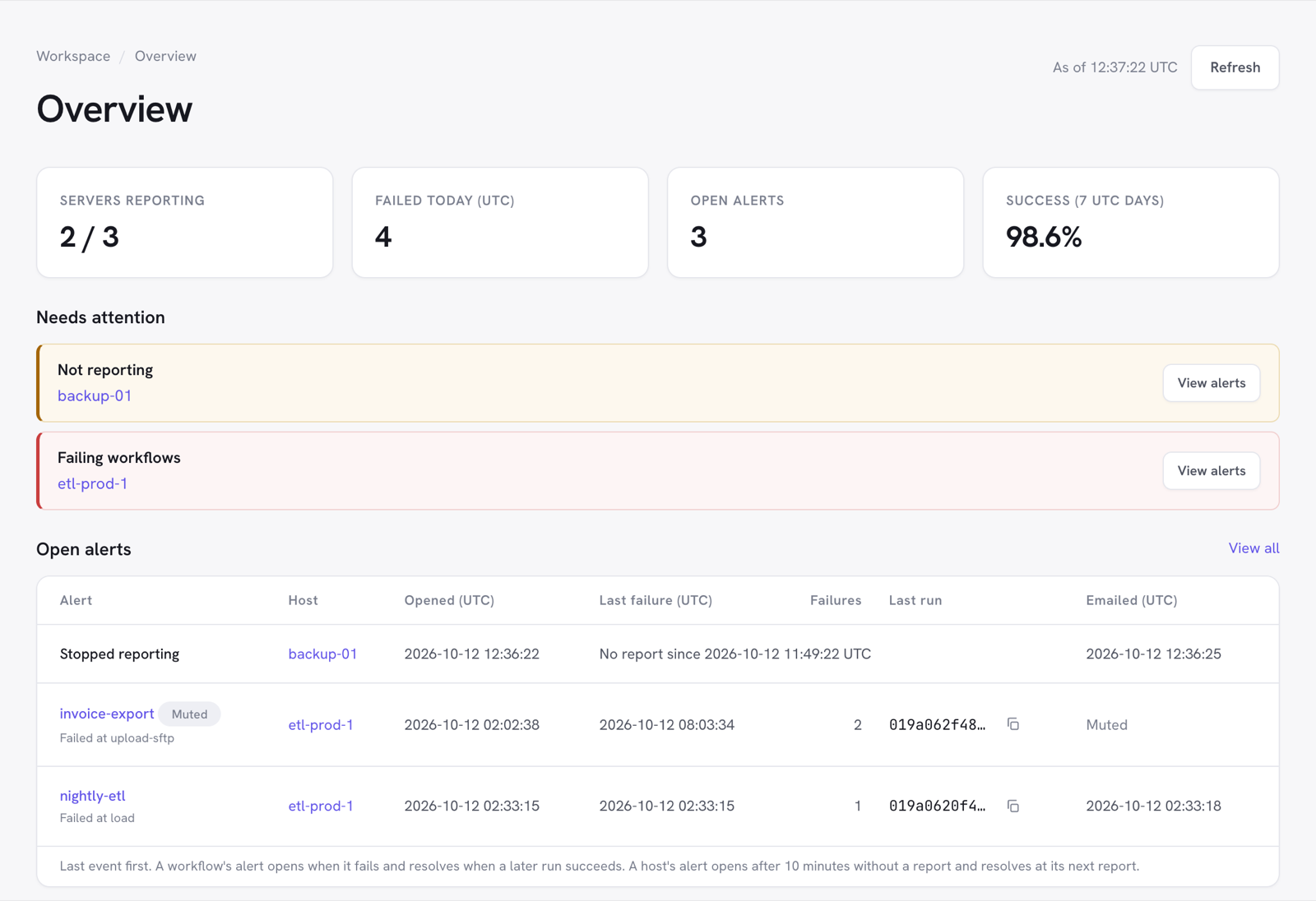
Reporting is opt-in and outbound HTTPS only. It carries metadata, plus failed steps' error messages at the level that names them. Full logs, outputs, parameters, and secrets never leave your servers, and workflows run the same whether or not the console can be reached. See Monitoring; it is free for one server, and Team and Pro cover every licensed server.
Why Dagu exists
Most teams that land here are not looking for a workflow platform. Their scripts and containers already work. The scheduler around them is the problem: it takes more time to operate than it saves.
Orchestration is not your main work. A big platform brings its own database, worker fleet, upgrades, and alerts. You wanted to schedule some jobs. Now you operate a second system.
Workflow structure is not business logic. The YAML declares order, retries, schedules, and human tasks. What each step actually does stays in the script or container you already have.
A script should not carry its own schedule. No cron parsing, no retry loop, no check for whether the last run is still going. That belongs to whatever runs the script, not the script itself.
Dagu keeps workflow structure in one YAML file next to the tools that do the work. Nothing moves into a framework, so your scripts keep working with or without Dagu. The YAML is what adds a dependency graph, retries, per-step logs, history, and a Web UI to every run.
The Dagu mascot
The degu (Octodon degus), a small rodent native to Chile related to chinchillas and porcupines, serves as the Dagu project mascot. It aptly symbolizes Dagu's characteristics, such as simplicity, industry, and self-sufficiency. Degus reflect Dagu's mission to run schedules, retries, and everyday automation efficiently, without external databases or heavyweight frameworks. The name also echoes "DAG," Dagu's core unit of work. The degu crafts a brand identity that reflects the project's core principles.