

Artifacts
DAG run artifacts are arbitrary files written by a DAG run. They are separate from logs and step outputs.
Dagu stores artifacts when artifact storage is enabled explicitly, or when a DAG references ${context.paths.artifacts_dir}, uses an artifact action, or uses stdout.artifact / stderr.artifact.
DAG Configuration
For command output, prefer attaching stdout or stderr directly to an artifact:
steps:
  - id: generate_report
    run: ./generate-report --format markdown
    stdout:
artifact: reports/summary.mdThis pattern is useful for large reports, JSON snapshots, Markdown summaries, and other data that a command naturally writes to stdout or stderr. It avoids routing large payloads through output: variables.
It also auto-enables artifact storage. Use the artifacts block at the root of a DAG when you need explicit control:
artifacts:
  enabled: true
dir: /mnt/dagu-artifactsSupported fields:
| Field | Type | Description |
|---|---|---|
artifacts.enabled | boolean | Explicitly enables or disables per-run artifact storage. When omitted, Dagu auto-enables storage for ${context.paths.artifacts_dir} references, artifact actions, and artifact stream outputs. |
artifacts.dir | string | Optional base directory for this DAG's artifacts. When omitted, Dagu uses the global paths.artifact_dir. |
artifacts.dir alone does not enable artifact storage for a DAG with no ${context.paths.artifacts_dir} references, artifact actions, or artifact stream outputs. Set artifacts.enabled: true when you need artifact storage active without one of those auto-enable triggers.
If artifacts.enabled: false is set explicitly, using artifact.*, stdout.artifact, or stderr.artifact is invalid. References to ${context.paths.artifacts_dir} also stay disabled, so the artifact path is not set.
Global Configuration
The global base directory is configured in config.yaml:
paths:
artifact_dir: /var/lib/dagu/artifactsEnvironment variable:
export DAGU_ARTIFACT_DIR=/var/lib/dagu/artifactsDefault:
<paths.data_dir>/artifactsIf a DAG sets artifacts.dir, that DAG-specific base directory is used instead of paths.artifact_dir.
Directory Layout
Artifact directories use the same per-run layout as log_dir:
<base>/<safe dag name>/dag-run_<YYYYMMDD_HHMMSSZ>_<dag-run-id>/Example:
/var/lib/dagu/artifacts/daily-report/dag-run_20260412_031500Z_run-123/Runtime Variable
When artifact storage is active, ${context.paths.artifacts_dir} resolves to the per-run artifact path in value-resolved fields, and Dagu sets DAG_RUN_ARTIFACTS_DIR for processes. Artifact storage is active when enabled explicitly or auto-enabled by a ${context.paths.artifacts_dir} reference, artifact action, or artifact stream output.
steps:
  - id: write_files
    run: |
      test -n "${context.paths.artifacts_dir}"
      mkdir -p "${context.paths.artifacts_dir}/images"
      printf 'hello\n' > "${context.paths.artifacts_dir}/hello.txt"
cp ./chart.png "${context.paths.artifacts_dir}/images/chart.png"Execution mode behavior:
- Local execution writes directly into the final artifact directory.
- Distributed workers write into a worker-local staging directory first. Dagu uploads those files back to the coordinator before the run finishes.
Example: Markdown Report And Image Preview
A common pattern is to stream a Markdown report to an artifact and write generated sidecar files into the artifact directory:
steps:
  - id: build_report
    run: ./audit --format markdown
    stdout:
      artifact: reports/summary.md

  - id: build_sidecars
    run: |
      set -eu
      mkdir -p "${context.paths.artifacts_dir}/reports" "${context.paths.artifacts_dir}/images"
      cp ./charts/service-latency.png "${context.paths.artifacts_dir}/images/service-latency.png"
      printf 'status=ok\n' > "${context.paths.artifacts_dir}/reports/metadata.txt"
depends: build_reportThis gives the run a Markdown report, a plain-text sidecar file, and an image that operators can preview directly in the Web UI.
Stream Output To Artifacts
stdout and stderr accept an artifact object form:
steps:
  - id: export_json
    run: ./export --format json
    stdout:
      artifact: exports/data.json
    stderr:
artifact: logs/export.errArtifact stream paths are relative to the DAG-run artifact directory. Parent directories are created automatically. Absolute paths, Windows drive paths, and paths containing .. are rejected.
Each execution attempt replaces the artifact. After a retry_policy retry, a repeat_policy repetition, or dagu retry, the file holds only the latest attempt's output. A step that does not run, for example because a precondition skips it, leaves the existing artifact unchanged. String-form file redirects such as stdout: ./out.log append instead.
stdout and stderr cannot write to the same artifact file, even when the two paths are spelled differently. Use log_output: merged to combine the streams in the step log.
Use this when the command output is the artifact. Use string-form output: NAME only for small values such as IDs, counts, and version strings.
Web UI
The DAG run details page shows an Artifacts tab when the DAG enables artifact storage or the run already has an archiveDir. The tab uses a file tree on the left and a preview pane on the right.
Example with a Markdown report selected while an image artifact is available in the same run:
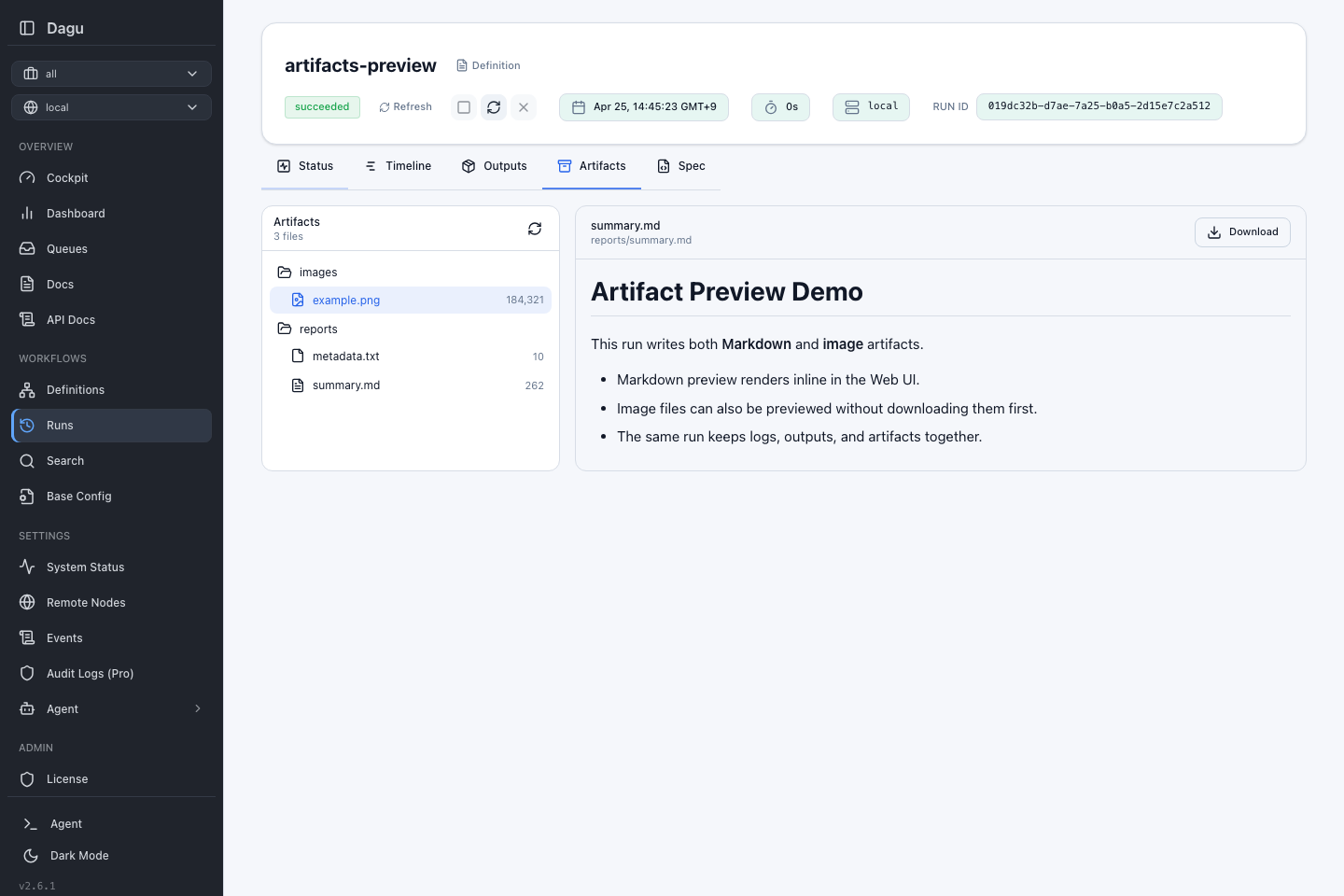
Supported actions:
- Browse directories and files
- Download any file
- Preview markdown
- Preview text files
- Preview image files
Preview behavior:
- Markdown and text preview up to
2 MiB - Image preview up to
5 MiB - Binary files are download-only
- Files over the inline preview limit show metadata only and must be downloaded
The artifact browser ignores symlink entries.
See Web UI for the broader UI walkthrough.
API
Root DAG run endpoints:
GET /api/v1/dag-runs/{name}/{dagRunId}/artifactsGET /api/v1/dag-runs/{name}/{dagRunId}/artifacts/preview?path=...GET /api/v1/dag-runs/{name}/{dagRunId}/artifacts/download?path=...
Sub DAG run endpoints:
GET /api/v1/dag-runs/{name}/{dagRunId}/sub-dag-runs/{subDAGRunId}/artifactsGET /api/v1/dag-runs/{name}/{dagRunId}/sub-dag-runs/{subDAGRunId}/artifacts/preview?path=...GET /api/v1/dag-runs/{name}/{dagRunId}/sub-dag-runs/{subDAGRunId}/artifacts/download?path=...
Example:
curl "http://localhost:8080/api/v1/dag-runs/daily-report/run-123/artifacts"

curl "http://localhost:8080/api/v1/dag-runs/daily-report/run-123/artifacts/preview?path=reports/summary.md"

curl -OJ "http://localhost:8080/api/v1/dag-runs/daily-report/run-123/artifacts/download?path=reports/summary.md"The preview response reports:
| Field | Description |
|---|---|
kind | One of markdown, text, image, or binary |
mimeType | Detected MIME type |
size | File size in bytes |
tooLarge | true when the file exceeds the inline preview limit for its kind |
truncated | true when inline markdown or text content was shortened for preview |
content | Inline content for markdown and text previews only |
Cleanup
Artifact directories are deleted together with the corresponding DAG run when using dagu rm --history or automatic history-retention cleanup. This applies to root and sub-DAG runs.
Artifacts vs Outputs
| Feature | Stored As | Scope | UI |
|---|---|---|---|
| Artifacts | Arbitrary files | Per DAG run | DAG run Artifacts tab |
| Outputs | Small key/value results in outputs.json | Per DAG run or action boundary | DAG run Outputs tab |