

Workspaces
Workspaces Become Projects in v3.0
v3.0 replaces workspaces with projects, and a migration command moves workspace settings into them. No action is needed now. See Projects in v3.0 for the settings Dagu reports. Leave feedback on issue #3288.
Workspaces organize workflows and runs inside one Dagu installation. Use them to separate workflows by team, business function, product, or operational responsibility, such as finance, data-platform, customer-support, or platform-ops.
Workspaces can also scope access, Wiki pages, managed secrets, profile defaults, notifications, and incident routing.
Workspaces Are Not Environment Boundaries
Workspaces share the same Dagu deployment, including its scheduler, local execution environment, coordinator, workers, queues, storage configuration, and Git Sync configuration. For development, staging, and production isolation, run separate Dagu deployments.
When to Use Workspaces
Use workspaces when you want to:
- keep the DAG list focused on one team or business function
- review only the runs that belong to a project
- keep runbooks and operational notes with the team that owns them
- keep Web UI-managed secrets scoped to the workflows that use them
- route notifications to the responsible team's channels
- route incidents to the responsible team's PagerDuty or SolarWinds connections
- give a user or API key access to a selected set of workflows
Workspaces are an organizational and access-control feature inside one Dagu installation. They provide application-level scoping for several Dagu-managed resources, but they do not isolate execution infrastructure or replace deployment-level isolation.
What Workspaces Do Not Separate
Adding workspace=<name> does not create an independent runtime. Workflows in every workspace still use the installation's process-level configuration.
| Concern | How to Control It |
|---|---|
| Local or distributed execution | Configure the deployment's default_execution_mode or use worker_selector: local on a DAG. |
| Distributed worker placement | Use worker_selector and worker labels. |
| Queue capacity and concurrency | Assign workflows to named queues. |
| Runtime variables and credentials | Use runtime profiles and workflow secrets. |
| Development, staging, and production isolation | Run separate Dagu deployments. |
The scheduler loads and evaluates workflows across the deployment regardless of their workspace labels. Local runs use the same local execution environment, while distributed runs use the deployment's configured coordinator and worker pool unless the DAG applies its own worker selector.
Selecting a Workspace
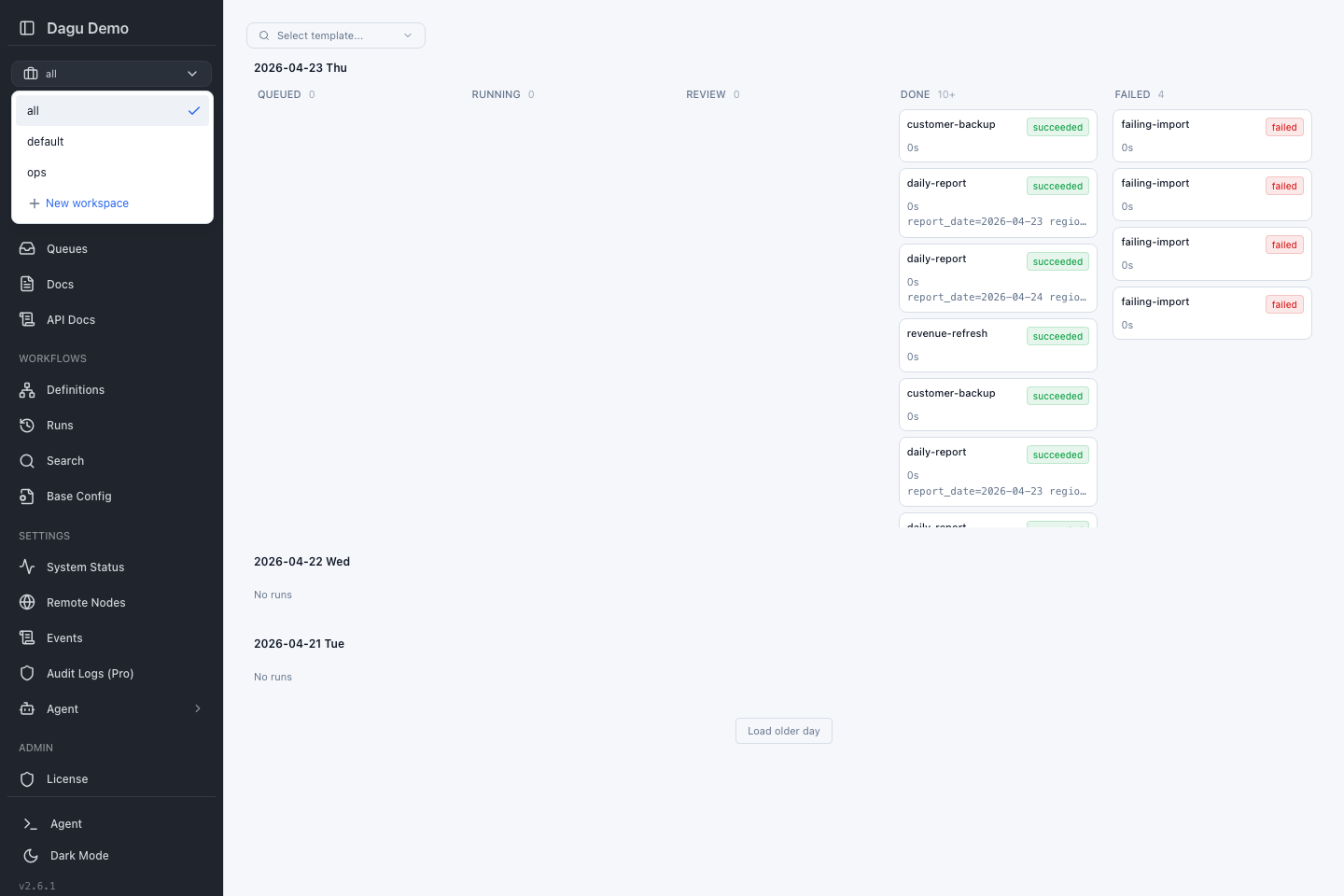
The workspace selector is in the left navigation above the remote node selector. It affects workspace-aware pages such as Cockpit, Wiki, Dashboard, Definitions, Runs, Search, Design, Notifications, and Incident Routing.
| Selection | What You See |
|---|---|
| All workspaces | Everything your account can access across workflows, runs, and Wiki pages. Wiki page changes are disabled in this aggregate view. |
| Default | Workflows without a workspace label and Wiki pages outside named-workspace directories. |
| Named workspace | Only workflows, runs, and Wiki pages for that workspace. |
The selector stays on your last choice in the browser, so switching from finance to Runs keeps the same focus.
Creating a Workspace
Users who can write workflows can create workspaces from the selector:
- Open the workspace selector.
- Choose New workspace.
- Enter a short name such as
financeordata-platform. - Press Enter.
Use letters, numbers, underscores, and hyphens. Avoid spaces, slashes, dots, and punctuation. The names all, default, and global are reserved for built-in scopes and selector choices.
Adding Workflows to a Workspace
A workflow belongs to a named workspace when its DAG labels include workspace=<name>:
labels:
  - workspace=finance
  - team=accounting
steps:
  - id: run
run: ./daily-report.shAfter saving the DAG, select finance in the Web UI to see it with the matching runs. A workflow with no workspace label appears under Default.
When you start or enqueue a workflow from Cockpit while a named workspace is selected, Dagu adds the matching workspace label to the run so it appears in the same workspace view.
Wiki in Workspaces
The Wiki page uses the same workspace selector as workflows and runs. Default Wiki pages live directly under paths.wiki_dir; Wiki pages in a named workspace live under <paths.wiki_dir>/<workspace>/.
<paths.wiki_dir>/
|-- shared-runbook.md             # Default
`-- finance/
`-- month-end-close.md # finance workspaceWorkspace access filters the Wiki page tree, content search, and global search results. All workspaces combines the Wiki pages the current account can access for browsing and search. Select Default or one named workspace before creating, renaming, moving, or deleting a Wiki page.
Wiki pages cannot be dragged across workspace boundaries. Renaming a workspace moves its Wiki page directory to the new name. Deletion is blocked while the workspace still contains Wiki pages, which prevents them from losing their workspace ownership.
Secrets in Workspaces
The DAG Secret Refs tab on the Profiles & Secrets page supports global and workspace scopes. A Dagu-managed secret with ref database/password in finance is different from a secret with the same ref in data-platform.
DAGs resolve registry refs from their own workspace:
labels:
  - workspace=finance

secrets:
  - name: DB_PASSWORD
ref: database/passwordDo not include the workspace name in the ref. Select the workspace in the Web UI, open Profiles & Secrets, create database/password from DAG Secret Refs, and use the same ref in DAGs for that workspace. Workflows without a workspace label use the Global secret scope.
Global secrets are workspace-less values. A workflow in finance checks finance first, then Global. It never reads another named workspace.
See DAG Secret Refs for the Web UI workflow and Workflow Secrets for the YAML reference.
Profile Defaults in Workspaces
The Profiles tab on the Profiles & Secrets page supports workspace runtime profile defaults. These are variables and profile-owned secrets that apply automatically to DAGs in a named workspace.
A DAG in workspace=finance receives:
Global profile defaults < finance workspace profile defaults < selected runtime profileWorkspace defaults are useful for baseline values that all workflows in a workspace need, such as REGION, internal service URLs, or team-specific credentials. They are not selectable profiles and do not apply to workflows in other workspaces.
See Profiles and Runtime Profiles for the full layering model.
Notifications in Workspaces
Notification rules can be Global or workspace-scoped.
- Global rules are the default for every DAG.
- A named workspace can either inherit Global rules or configure its own routes.
- A DAG can still override the workspace when it needs a one-off destination.
Use workspace notification rules when each business function or team has its own Microsoft Teams or Slack channel, email list, Telegram chat, or webhook endpoint. A workflow with labels: [workspace=finance] uses the finance workspace rules when they are configured; otherwise it falls back to Global.
See Notifications for the full routing model.
Incidents in Workspaces
Incident routing can be Global or workspace-scoped.
- Global routing is the default for every DAG.
- A named workspace can inherit Global routing, configure its own incident routes, or turn incidents off.
- A DAG can still override the workspace from the DAG detail Incidents tab when it needs a one-off route.
Use workspace incident routing when each business function or team has its own PagerDuty service or SolarWinds Incident Response endpoint. A workflow with labels: [workspace=finance] uses the finance workspace incident route when it is configured; otherwise it falls back to Global.
See Incident Routing for the full routing model and license requirements.
Access Rules
Admins can give users and API keys access to all workspaces or selected workspaces.
- All workspaces: the user's normal role applies everywhere.
- Selected workspaces: each workspace can have its own role, such as developer in
data-platformand viewer infinance. - Default: resources without a workspace label remain visible according to the user's top-level role.
Workspace access narrows what users see in list, search, and workspace-aware pages. It does not replace deployment-level isolation.
See User Management and API Keys for the admin screens that assign workspace access.
Deleting a Workspace
Deleting a workspace removes it from the selector. It does not delete DAG files, Wiki pages, run history, users, or API keys.
Before deleting a workspace, check whether:
- its Wiki tree is empty; move or remove its Wiki pages first
- any DAGs still use
workspace=<name> - users or API keys are scoped to that workspace
Dagu rejects the deletion while Wiki pages remain in the workspace. This keeps those files from becoming visible as default Wiki pages after their workspace disappears.
After deletion, update affected DAG labels and access grants so future work stays easy to find.
Projects in v3.0
When the web server starts, it logs one warning, Workspaces become projects in v3.0, and a migration command moves these settings, so no action is needed now, with a settings attribute that lists every workspace setting in use that v3.0 moves into projects:
| Setting | Reported When |
|---|---|
| Base config | <paths.dags_dir>/workspaces/<workspace>/base.yaml has content. |
| Secret | A Dagu-managed secret belongs to a named workspace. |
| Profile entry | A workspace profile default has entries. |
| Notification route | A workspace configures its own notification routes instead of inheriting Global. |
| Incident policy | A workspace configures its own incident routing instead of inheriting Global. |
| Config key | auth.oidc.role_mapping or auth.proxy.role_mapping sets workspace_mappings or default_workspace_access. |
| User or API key | Access is limited to selected workspaces. |
| Wiki directory | A DAG in a named workspace has a per-DAG Wiki directory at <paths.wiki_dir>/<workspace>/<dag>. |
Admins see the same list behind a warning icon in the left navigation. The notice links to the feedback issue. Dismiss hides the icon in that browser until another setting comes into use. Neither the warning nor the icon appears when no workspace settings are in use.
API Access
Most users manage workspaces from the Web UI. Automation can use the REST API when needed:
| Action | Endpoint |
|---|---|
| List workspaces | GET /api/v1/workspaces |
| Create a workspace | POST /api/v1/workspaces |
| Rename or update a workspace | PATCH /api/v1/workspaces/{workspaceId} |
| Delete a workspace | DELETE /api/v1/workspaces/{workspaceId} |
| List workspace settings that v3.0 moves into projects (admin) | GET /api/v1/workspaces/deprecation |
For request and response details, see REST API.