

Cockpit
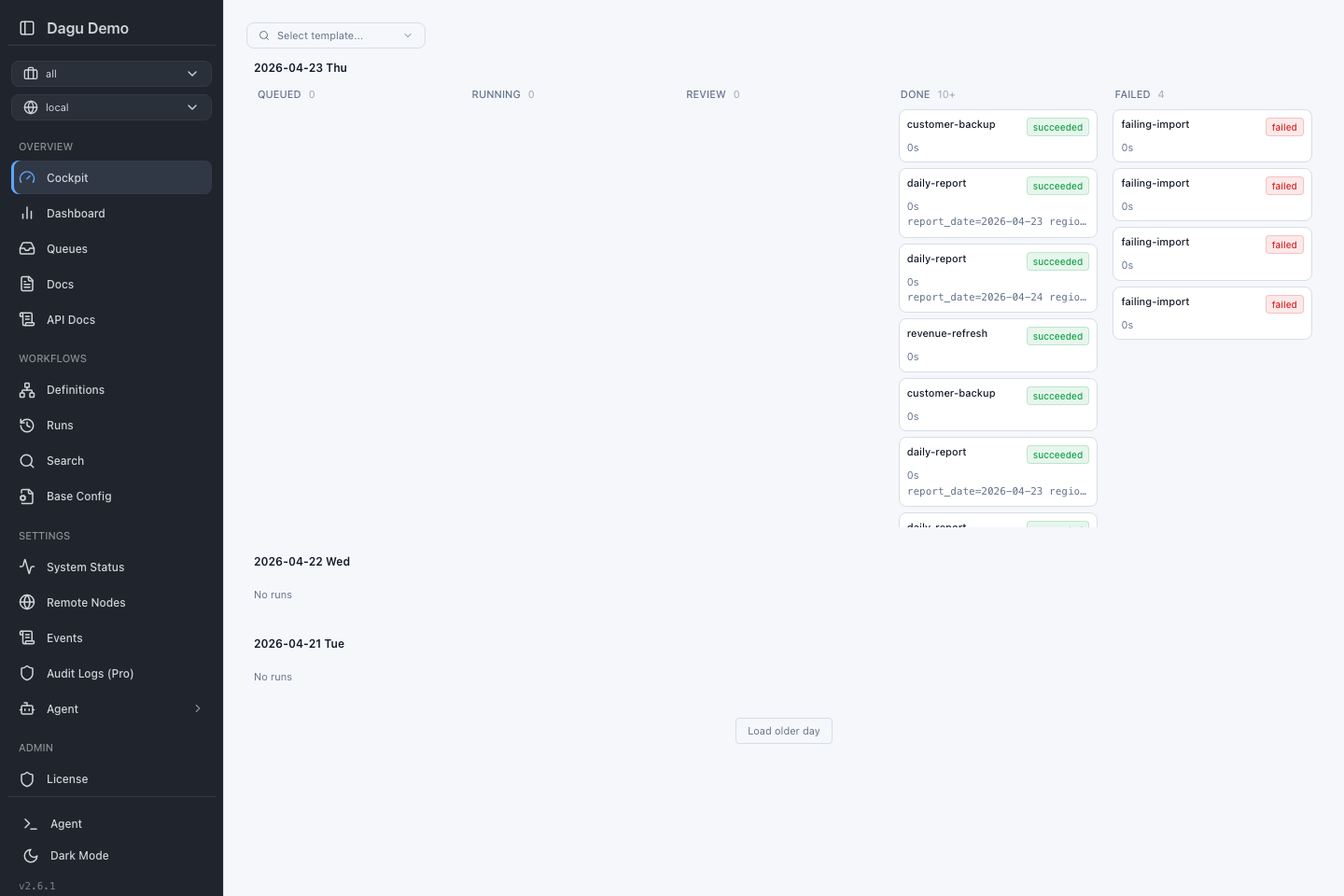
Cockpit is a kanban-style view for monitoring workflow runs across days. It is the default Web UI landing page and provides a quick overview of what is queued, running, waiting for review, done, or failed.
Opening Cockpit
Open Cockpit from the left navigation or visit /cockpit.
The page follows the global workspace selector:
| Selection | What Cockpit Shows |
|---|---|
| All workspaces | Runs from every workspace you can access. |
| Default | Runs from workflows without a workspace label. |
| Named workspace | Runs from that workspace only. |
Switching workspaces refreshes the board so you can focus on one team, environment, or project.
Board Layout
Cockpit groups runs by date and status:
| Column | Meaning |
|---|---|
| Queued | Runs waiting to start. |
| Running | Runs currently executing. |
| Review | Local or distributed root runs paused for approval or human-task input. Open the run to complete the generated human-task form. |
| Done | Successful or partially successful runs. |
| Failed | Failed, aborted, or rejected runs. |
Each card shows the workflow name, status, elapsed time, and a short parameter preview. Click a card to open the run details page.
Browsing Older Runs
Cockpit starts with recent days. Scroll down and click Load older day to inspect earlier activity. Today's runs update live while the page is open.
Starting a Workflow from Cockpit
Use the template selector at the top of the page to find a workflow:
- Click Select template.
- Search by workflow name or browse grouped workflows.
- Select a workflow to open the preview panel.
- Review parameters and choose Start or Enqueue.
When a named workspace is selected, Cockpit starts the run in that workspace. When All workspaces or Default is selected, Cockpit does not add a named workspace to the run.
Preview Panel
The preview panel shows the same workflow information you see on the workflow details page:
- workflow description and labels
- schedule information
- parameter inputs
- start and enqueue controls
- validation errors, if the workflow cannot be loaded
Typed parameters render as friendly controls such as text inputs, selects, number fields, and toggles. Workflows without typed parameter metadata use the raw parameter editor.
Keyboard Shortcuts
| Key | Action |
|---|---|
Escape | Close the preview panel. |
f | Open the workflow in the full details page. |
Cmd/Ctrl + Click on fullscreen | Open the workflow in a new tab. |
Shortcuts are ignored while you are typing in an input or textarea.
Tips
- Use workspaces to keep the board from mixing unrelated teams or environments.
- Use labels on workflows to make the template selector easier to scan.
- Click a run card when you need logs, step status, outputs, artifacts, or retry controls.