OpenAI Subscription
This page documents the openai-codex provider in the built-in Web UI agent.
In Dagu, this provider uses a stored ChatGPT subscription login, not an OpenAI API key.
The current implementation uses:
- Provider ID:
openai-codex - UI label:
OpenAI Codex - Auth provider name:
ChatGPT Plus/Pro (Codex Subscription)

What This Provider Uses
For openai-codex, Dagu stores an OAuth credential for the selected node and resolves it at request time.
This is different from the openai provider:
openaiuses an API keyopenai-codexuses a ChatGPT subscription login
In the current settings UI and backend:
- API keys are not used for
openai-codex - Custom base URLs are not used for
openai-codex - A model cannot be created or updated unless the selected node already has a valid
openai-codexlogin
At runtime, Dagu sends openai-codex agent requests to the Codex backend with the stored access token and ChatGPT account ID.
Where To Configure It
You can configure this flow in either place:
/agent-settings/setup
Both UIs use the same backend auth endpoints and the same ProviderAuthCard component.
The configuration is scoped to the currently selected node:
- In the Web UI, requests include the current
remoteNode - If the app bar is set to
local, the credential is stored for the local node - If the app bar is set to a remote node, the credential is stored for that remote node
Web UI Steps
1. Open Agent Settings
Go to /agent-settings.
If the built-in agent is disabled, enable it first.
2. Connect the subscription
In the OpenAI Codex provider card:
- Click
Connect - Dagu starts a manual OAuth flow and opens the returned
authUrl - Complete the OpenAI login in the browser
- Paste either:
- the full redirect URL
- the authorization code
- Click
Complete Login
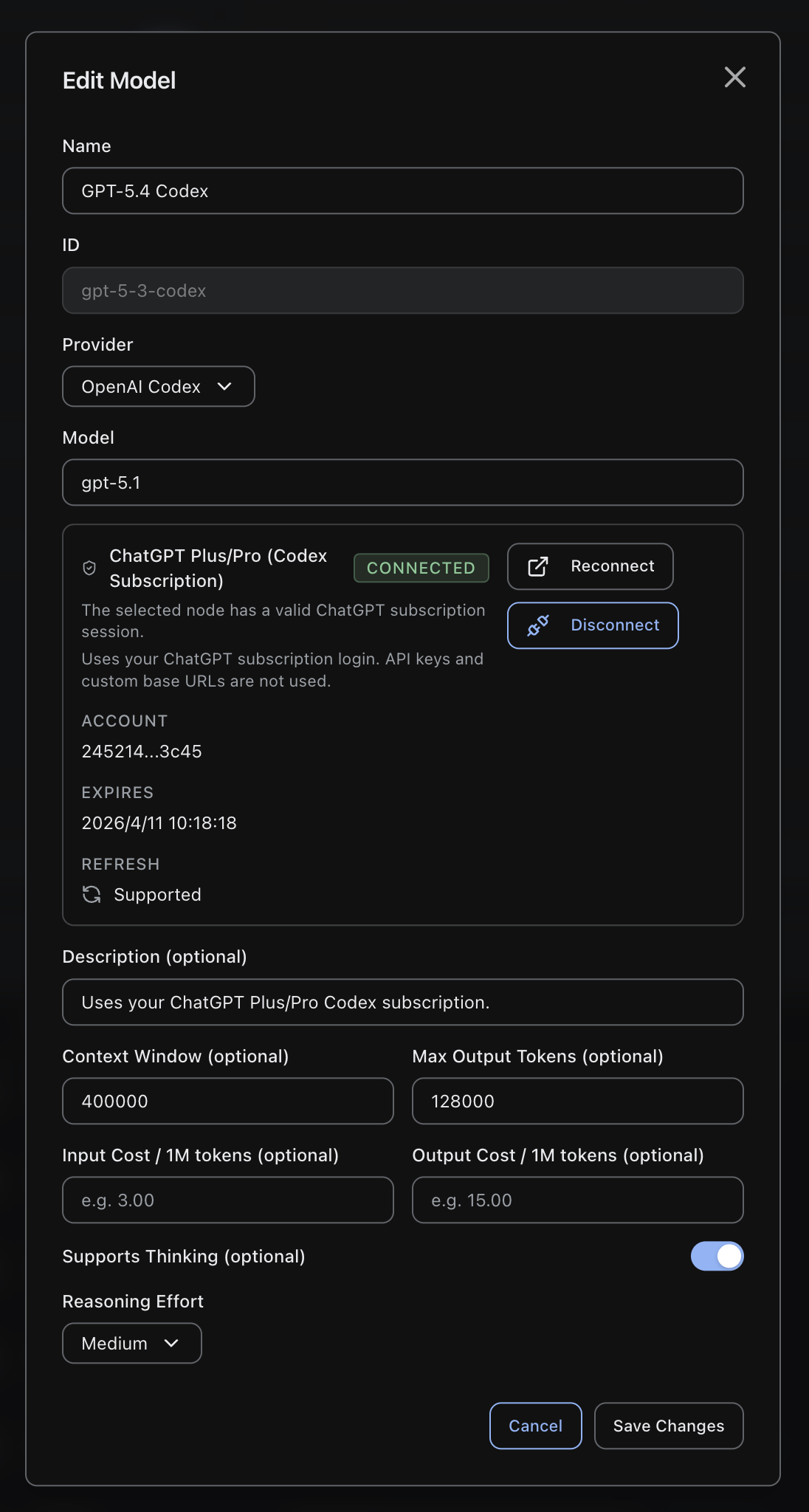
The UI shows:
- connection status
- masked account ID
- expiry timestamp when available
If the credential expires and refresh is no longer possible, the UI shows Expired and you must reconnect.
3. Create the model entry
Open Add Model and set:
Provider:OpenAI CodexModel: the provider model ID you want Dagu to send, for examplegpt-5.4orgpt-5.4-miniName: any display nameID: any stable model ID, or accept the generated slug
The form does not use API Key or Base URL for this provider.
The current preset list includes Codex presets such as:
GPT-5.4 CodexGPT-5.4 Codex Mini
4. Set the default model
After the model is created, set it as the default model if you want the built-in agent to use it by default.
The built-in agent uses the default model unless the session selects another saved model.
Setup Wizard Steps
The setup wizard exposes the same provider.
When OpenAI Codex is selected in /setup:
- the API key input is not used
- the provider card requires a completed subscription login
- setup creates a model from the selected preset with
provider: openai-codex
If the provider is not connected, setup stops with:
Connect OpenAI Codex before completing setupAPI Flow
All auth endpoints require an authenticated admin user.
1. List provider status
curl -H "Authorization: Bearer $TOKEN" \
"$DAGU_BASE/api/v1/settings/agent/auth/providers?remoteNode=local"Response shape:
{
"providers": [
{
"id": "openai-codex",
"name": "ChatGPT Plus/Pro (Codex Subscription)",
"connected": true,
"expiresAt": "2026-04-01T12:34:56Z",
"canRefresh": true,
"accountId": "acct_..."
}
]
}2. Start login
curl -X POST \
-H "Authorization: Bearer $TOKEN" \
"$DAGU_BASE/api/v1/settings/agent/auth/providers/openai-codex/login?remoteNode=local"Response shape:
{
"flowId": "random-flow-id",
"authUrl": "https://auth.openai.com/oauth/authorize?...",
"instructions": "Open the URL in your browser. After authentication, copy the full redirect URL or the authorization code and paste it back into Dagu."
}3. Complete login with the pasted redirect URL
curl -X POST \
-H "Authorization: Bearer $TOKEN" \
-H "Content-Type: application/json" \
"$DAGU_BASE/api/v1/settings/agent/auth/providers/openai-codex/login/complete?remoteNode=local" \
-d '{
"flowId": "random-flow-id",
"redirectUrl": "http://localhost:1455/auth/callback?code=...&state=..."
}'You can also complete the flow with code instead of redirectUrl:
curl -X POST \
-H "Authorization: Bearer $TOKEN" \
-H "Content-Type: application/json" \
"$DAGU_BASE/api/v1/settings/agent/auth/providers/openai-codex/login/complete?remoteNode=local" \
-d '{
"flowId": "random-flow-id",
"code": "authorization-code"
}'The request schema requires:
flowId- at least one of
redirectUrlorcode
4. Create the model
curl -X POST \
-H "Authorization: Bearer $TOKEN" \
-H "Content-Type: application/json" \
"$DAGU_BASE/api/v1/settings/agent/models?remoteNode=local" \
-d '{
"id": "gpt-5-4-codex",
"name": "GPT-5.4 Codex",
"provider": "openai-codex",
"model": "gpt-5.4",
"supportsThinking": true,
"thinkingEffort": "high"
}'For this provider:
- the backend clears
apiKey - the backend clears
baseUrl - the backend validates that
openai-codexis already connected for the selected node
5. Set the default model
curl -X PUT \
-H "Authorization: Bearer $TOKEN" \
-H "Content-Type: application/json" \
"$DAGU_BASE/api/v1/settings/agent/default-model?remoteNode=local" \
-d '{
"modelId": "gpt-5-4-codex"
}'What Dagu Sends For This Provider
For the built-in agent runtime, openai-codex requests use:
- bearer token from the stored OAuth credential
- ChatGPT account ID extracted from the OAuth token
- provider model ID from the saved model entry
When thinkingEffort is set on the model and supportsThinking is enabled, Dagu includes:
{
"reasoning": {
"effort": "low|medium|high|xhigh",
"summary": "auto"
}
}If thinkingEffort is empty, Dagu does not force a reasoning effort in the request body.
Disconnect
To remove the stored subscription login for the selected node:
curl -X DELETE \
-H "Authorization: Bearer $TOKEN" \
"$DAGU_BASE/api/v1/settings/agent/auth/providers/openai-codex/login?remoteNode=local"Disconnecting the provider does not delete saved model entries. It only removes the stored OAuth credential.