

Incident Routing
License
Incident routing requires an active Dagu self-host license or trial. Existing self-host licenses include this feature; no separate incident add-on or new feature claim is required. See the pricing page for current availability.
Incident routing opens and resolves incidents in incident-management systems when workflow failures need an operational response. Use it for PagerDuty and SolarWinds Incident Response. Use Notifications when you only need Microsoft Teams, Slack, Google Chat, email, Telegram, or generic webhook messages.
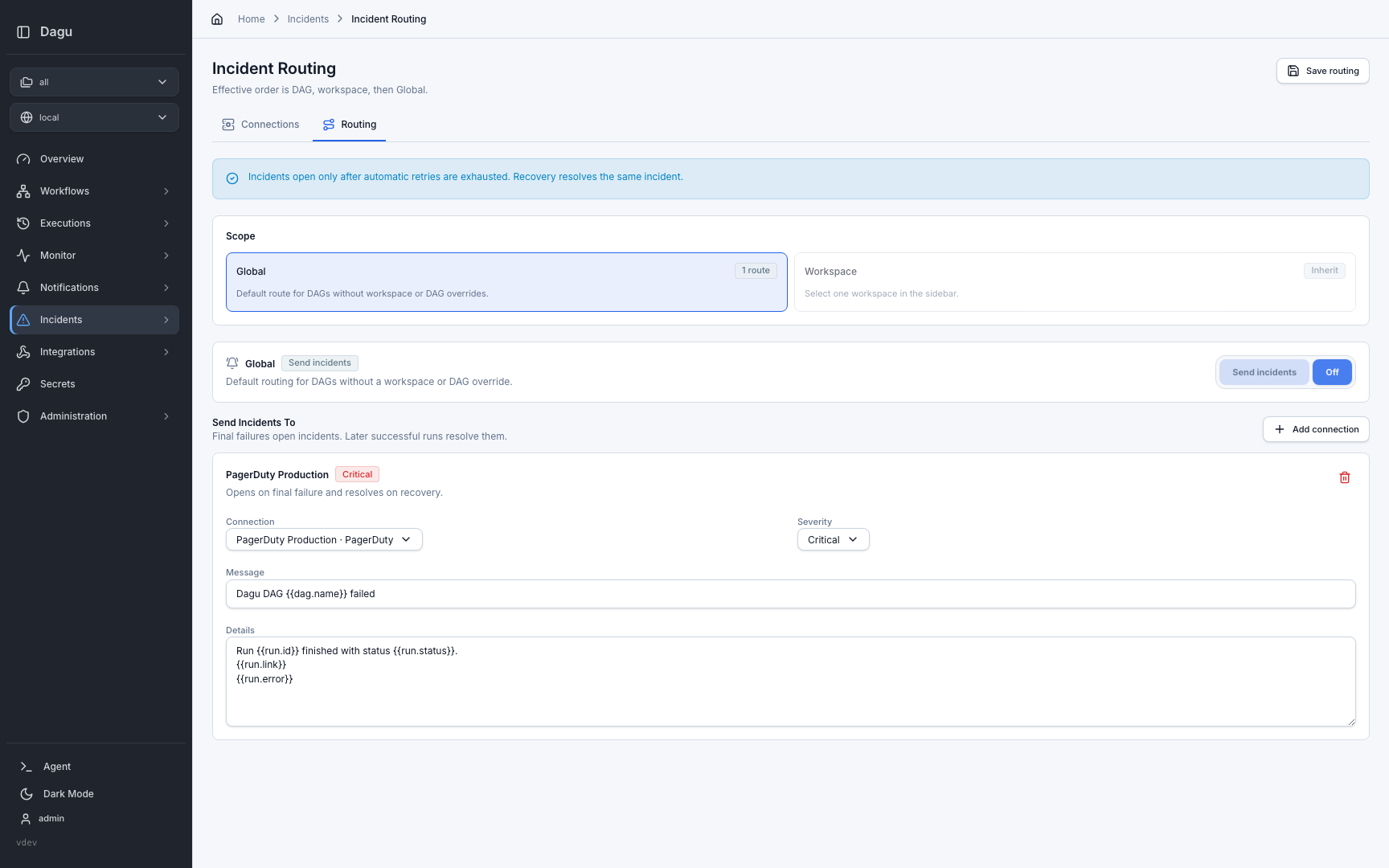
Mental Model
Incident routing has two parts:
- Connections store provider credentials once, such as a PagerDuty routing key or SolarWinds incoming webhook URL.
- Routing decides which connections receive incidents for Global, workspace, or DAG scopes.
Dagu uses the most specific configured scope:
DAG override -> workspace override -> Global defaultWhen a scope is set to inherit, Dagu checks the next broader scope. When a scope is configured, it overrides the parent scope. Setting a scope to Off suppresses incident creation for that scope.
Notifications vs Incidents
Notifications and incidents solve different problems:
| Feature | Use It For |
|---|---|
| Notifications | Chat, email, Telegram, and generic webhook messages for DAG-run events such as failed, waiting, rejected, aborted, or succeeded. Use this for ordinary destinations such as Microsoft Teams, Slack, and Google Chat. |
| Incident Routing | Provider incidents that open on final failure, deduplicate repeated failures, and resolve when the DAG recovers. |
Use both when operators should receive a chat message and an incident should also be opened in the escalation system.
Do not add chat tools as incident connections unless they manage an incident lifecycle. Microsoft Teams, Slack, Google Chat, email, and simple webhooks are notification destinations; PagerDuty and SolarWinds Incident Response are incident connections because they support trigger, deduplication, and resolve semantics.
Setup
- Configure
public_urlso incident messages can include absolute links back to the DAG run. - Open Incidents > Connections.
- Add a PagerDuty or SolarWinds Incident Response connection.
- Use Test on the connection before routing production workflows to it.
- Open Incidents > Routing.
- Configure the Global default route for all DAGs.
- Select a named workspace in the sidebar when a team or environment needs a workspace override.
- Use the DAG details Incidents tab only for per-DAG exceptions.
Keep most DAGs inherited. Global and workspace routes are easier to audit than one-off DAG settings.
Connections
Open Incidents > Connections to create reusable provider connections.
| Provider | Required Setting | Notes |
|---|---|---|
| PagerDuty | Events API v2 routing key | Dagu sends trigger and resolve events with the rendered dedup key. |
| SolarWinds Incident Response | Incoming webhook URL | Dagu sends trigger and resolve events using the rendered incident key. |
Secrets such as routing keys and webhook URLs are encrypted at rest. After saving, Dagu only returns redacted previews through the API and Web UI. Existing secret values are preserved when you edit a connection without entering a new secret.
Routing Scopes
Open Incidents > Routing to configure Global and workspace routing.
| Scope | Behavior |
|---|---|
| Global | Default route for every DAG. Global can be set to send incidents or off. |
| Workspace | Optional override for one named workspace. Workspace routing can inherit Global, send incidents to its own connections, or turn incidents off. |
| DAG | Optional override for one DAG from the DAG detail Incidents tab. DAG routing can inherit, send incidents to its own connections, or turn incidents off. |
A workflow with labels: [workspace=ops] uses the ops workspace route when it is configured. If ops inherits, the workflow uses Global. If the DAG has its own override, the DAG override wins.
Failure And Recovery
Dagu opens incidents only after the DAG run is finally failed. If DAG-level automatic retries remain, Dagu waits and does not open an incident for the intermediate failed attempt.
When a later run of the same DAG succeeds, Dagu resolves the saved open incident. Recovery resolution still runs even if the current route has been turned off, so disabling a route does not leave already-open incidents stranded.
Incident delivery is handled by the Dagu server-side event monitor, not by a workflow step. It works for local runs and distributed workers as long as the server receives DAG-run events.
Deduplication
Dagu uses the route's dedup key template to render the provider incident key. The default key is stable for each workspace and DAG:
dagu:workspace:{{workspace}}:dag:{{dag.name}}:failureRepeated final failures update the same provider incident until a later success resolves it. Dagu stores incident state by provider and rendered dedup key, so recovery can still resolve an open incident after a route is recreated or moved, as long as the provider and rendered dedup key stay the same.
Only customize the dedup key when you intentionally want a different incident stream. Keep it stable across failures and recoveries; changing it while an incident is open can create a new provider incident instead of resolving the old one.
Message Templates
Each route can customize the incident message and details. Templates use simple {{token}} replacement.
Defaults:
Message: Dagu DAG {{dag.name}} failed
Details:
Run {{run.id}} finished with status {{run.status}}.
{{run.link}}
{{run.error}}Common tokens:
| Token | Value |
|---|---|
{{dag.name}} or {{dagName}} | DAG name |
{{run.id}} or {{dagRunId}} | DAG run ID |
{{run.status}} or {{status}} | Run status |
{{run.error}} or {{error}} | Run error. When the run has none, the failed steps' errors as step: message, one per line |
{{run.path}} or {{runPath}} | Relative Web UI path for the DAG run |
{{run.url}} or {{runUrl}} | Absolute Web UI URL for the DAG run, when public_url is configured |
{{run.link}} or {{runLink}} | Run: ... line when an absolute run URL is available |
{{run.startedAt}} | Run start time |
{{run.finishedAt}} | Run finish time |
{{run.attemptId}} or {{attemptId}} | Attempt ID |
{{workspace}} | Workspace name, when present |
{{worker.id}} | Worker ID, when present |
{{event.type}} or {{eventType}} | Incident event type |
{{event.observedAt}} | Time the event was observed |
DAG Run Links
Default incident details include a DAG-run link when Dagu can build an externally reachable Web UI URL.
Set public_url in config.yaml to the absolute Web UI URL users should open from incident systems:
public_url: "https://dagu.example.com"You can also set it with DAGU_PUBLIC_URL. For Helm installs, use config.publicUrl:
config:
publicUrl: "https://dagu.example.com"If Dagu runs behind a reverse-proxy subpath, include that subpath in public_url:
public_url: "https://dagu.example.com/workflows"When public_url is not configured, {{run.url}} and {{run.link}} are empty. {{run.path}} is still available for systems that know the Dagu base URL.
Delivery Behavior
Dagu retries temporary provider delivery failures, including network errors, rate limits, and server errors. Permanent provider rejections, such as invalid credentials, are not retried as transient failures. Use connection tests after credential changes.
Provider state is stored by Dagu so repeated failures can update the same open incident and later successful runs can resolve it.
API
Most teams manage incident routing from the Web UI. Automation can use the REST API when needed:
| Action | Endpoint |
|---|---|
| List connections | GET /api/v1/incident-providers |
| Create a connection | POST /api/v1/incident-providers |
| Update a connection | PUT /api/v1/incident-providers/{providerId} |
| Delete a connection | DELETE /api/v1/incident-providers/{providerId} |
| Test a connection | POST /api/v1/incident-providers/{providerId}/test |
| List routing | GET /api/v1/incident-policies |
| Get or update Global routing | GET /api/v1/incident-policies/global, PUT /api/v1/incident-policies/global |
| Get or update workspace routing | GET /api/v1/incident-policies/workspaces/{workspaceName}, PUT /api/v1/incident-policies/workspaces/{workspaceName} |
| Get, update, or delete DAG routing | GET /api/v1/dags/{fileName}/incidents, PUT /api/v1/dags/{fileName}/incidents, DELETE /api/v1/dags/{fileName}/incidents |
For request and response details, see REST API.
Permissions
Users need developer, manager, or admin permission to manage incident connections and routing. On self-hosted Dagu, incident routing also requires an active license or trial. Without a license, the UI shows a license-required message for the incident pages.