

Notifications
Notifications route DAG-run events to team destinations without hard-coding Microsoft Teams or Slack webhooks, email recipients, Telegram chats, or webhook endpoints in every DAG file.
Use notifications for ordinary message delivery: Microsoft Teams, Slack, Google Chat, email, Telegram, or custom webhooks. Use Incident Routing only for systems that manage an incident lifecycle, such as PagerDuty or SolarWinds Incident Response.
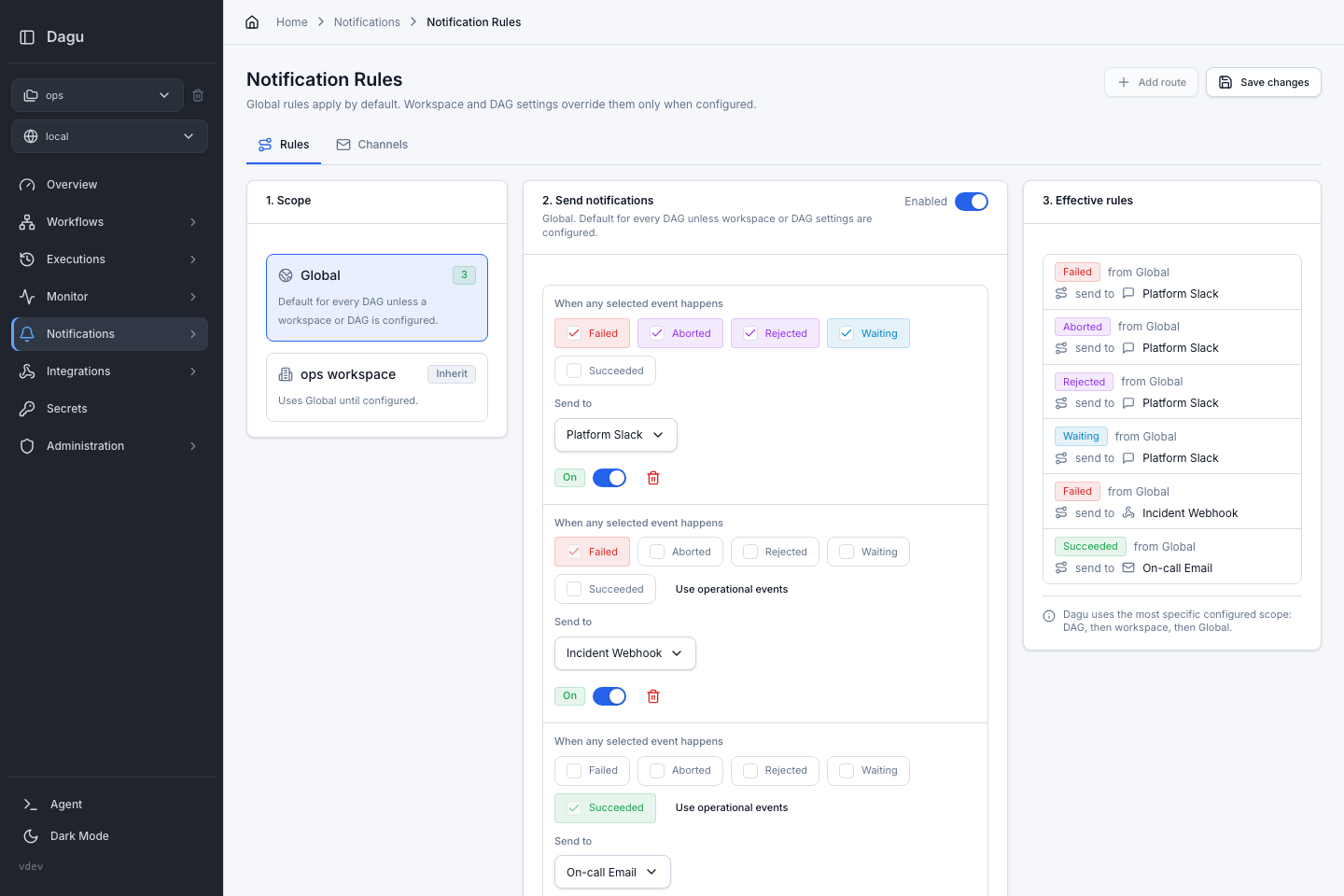
Mental Model
Notifications have two parts:
- Channels are reusable destinations, such as Microsoft Teams, Slack, email, Telegram, or a generic webhook.
- Rules decide which DAG-run events are sent to which channels.
Rules can be configured at three levels:
| Level | What It Means |
|---|---|
| Global | Default notification rules for every DAG. |
| Workspace | Optional override for DAGs in one workspace. |
| DAG | Optional override for one DAG. |
Dagu uses the most specific configured scope:
DAG override -> workspace override -> Global defaultWhen a scope is set to inherit, Dagu checks the next broader scope. When a scope is configured, it overrides broader scopes. A configured scope with no routes sends no notifications.
Events
The Web UI lets you route these DAG-run events:
| Event | Typical Use |
|---|---|
| Failed | Page the team when a run finishes in failure. |
| Aborted | Notify operators when a run is stopped. |
| Rejected | Surface queue, concurrency, or policy rejections. |
| Waiting | Ask for approval or manual intervention. |
| Succeeded | Notify only when successful completion matters. |
New rules default to the operational events: Failed, Aborted, Rejected, and Waiting. Succeeded is opt-in to avoid noisy channels.
When a DAG has DAG-level auto retry remaining, Dagu does not send the Failed notification for the intermediate failed attempt. The failure notification is sent only after the retry budget is exhausted and the DAG run is finally failed.
Channels
Open Notifications > Channels to create destinations before adding rules.
| Channel Type | Use It For |
|---|---|
| Slack | Send messages through a Slack incoming webhook. |
| Microsoft Teams | Send MessageCard notifications through a Teams Workflow or legacy incoming webhook. |
| Send to one or more recipients through the configured SMTP transport. | |
| Generic Webhook | POST a structured payload to an incident system, chat relay, or internal service. |
| Telegram | Send messages through a Telegram bot token and chat ID, optionally targeting a forum topic. |
For Google Chat or another service without a dedicated channel type, use a generic webhook and customize its JSON body to match the receiver's payload format.
Dagu encrypts channel secrets at rest, including webhook URLs, HMAC secrets, SMTP passwords, OAuth client secrets, refresh tokens, service-account JSON, and bot tokens. The API never returns SMTP secret values; the UI shows whether each secret is configured after save.
Microsoft Teams
Dagu sends Teams notifications as MessageCards. This format works with current Teams Workflows and legacy Microsoft 365 connector URLs, and provides useful notification preview text without requiring a card-format setting in Dagu.
To create a Teams channel:
- Open Workflows in Microsoft Teams and choose an incoming-webhook template for a chat or channel.
- Select the destination and authentication options, then save the Workflow.
- Copy the generated webhook URL. See Microsoft's incoming-webhook setup guide for the complete Teams steps.
- In Dagu, open Notifications > Channels, select Add, and choose Microsoft Teams.
- Paste the HTTPS webhook URL and optionally customize the message template.
- Save the channel and use Send test before adding it to notification rules.
Teams webhook URLs must use HTTPS. Dagu encrypts the URL at rest and shows only a redacted preview after it is saved. Editing a channel without entering another URL preserves the saved value.
The default Teams message includes {{run.link}}. Configure public_url when recipients should be able to open the DAG run from Teams.
Telegram Forum Topics
To send notifications to a specific topic in a Telegram forum group, set the optional Topic ID on the Telegram channel. Dagu sends this value as Telegram's message_thread_id.
The topic ID must be a positive integer. Leave it blank for regular chats or to keep the existing Telegram delivery behavior. To find the ID, inspect a Bot API update for a message posted in the topic and use the message's message_thread_id.
After saving the channel, use the Test action to confirm that the bot can post to the selected chat and topic.
Email Delivery
Email has two layers:
- Email Delivery configures the SMTP transport, authentication, and default sender.
- Email channels configure recipients, subject/body templates, and whether to attach logs.
Configure SMTP once on the Channels page, then reuse email channels from Global, workspace, or DAG rules.
Email Delivery supports two authentication modes:
| Authentication | Configuration |
|---|---|
| Password | SMTP host, port, username, password, and default sender |
| OAuth 2.0 | Provider, sender mailbox, provider credentials, and default sender |
OAuth 2.0 supports these providers:
| Provider | Required credentials |
|---|---|
| Microsoft 365 | Tenant ID, client ID, and client secret |
| Google Workspace service account | Service-account JSON with domain-wide delegation |
| Google refresh token | OAuth client ID, client secret, and refresh token |
OAuth is optional for Gmail. Choose the authentication method based on how the sender mailbox is managed:
| Gmail setup | Authentication to choose |
|---|---|
| Personal Gmail or one manually managed mailbox | Password, using a Google app password |
| Centrally managed Google Workspace automation | OAuth 2.0 → Google Workspace service account |
| Existing Google OAuth client and refresh token, or a policy that prohibits app passwords | OAuth 2.0 → Google refresh token |
For the simplest personal Gmail setup, enable 2-Step Verification, create a Google app password, then select Password in Email Delivery. Enter smtp.gmail.com, port 587, the Gmail address as the username, and the 16-character app password as the password. Do not enter the account's normal password. App passwords may be unavailable for some work or school accounts and accounts protected by certain advanced security settings; see Google's app-password documentation.
For OAuth, Dagu selects the provider endpoint automatically and disables the host and port fields. Microsoft uses smtp.office365.com:587; Google uses smtp.gmail.com:587. OAuth delivery requires STARTTLS and XOAUTH2.
Leaving a secret field blank preserves the stored value only while the OAuth identity is unchanged. Changing the provider, sender mailbox, Microsoft tenant ID, or OAuth client ID invalidates the stored credential state; enter the required secret for the new identity before saving. Switching to Password and saving removes the OAuth configuration.
Finish the provider setup before testing delivery. See Email Notifications for Microsoft and Google setup instructions.
Rules
Open Notifications > Rules to connect events to channels.
Global Rules
Use Global rules for organization-wide defaults such as:
- failed production workflows go to
#platform-alerts - waiting workflows notify approvers
- rejected runs send to an operations webhook
Every DAG inherits Global rules unless a workspace or DAG override is configured.
Workspace Rules
Select a named workspace in the Web UI, then open Notifications > Rules.
Workspace rules can either:
- Inherit Global: use the Global rules as-is.
- Configure Workspace: replace Global rules for DAGs in that workspace.
Use workspace overrides when teams have separate channels, such as data, ops, or production.
DAG Overrides
Open a DAG, then use the Notifications tab for per-DAG exceptions.
Keep DAG notifications inherited for most workflows. Configure a DAG override only when one workflow needs a different destination or event set from its workspace.
Message Templates
Each channel can customize the message text. Templates use simple {{token}} replacement.
Common tokens:
| Token | Value |
|---|---|
{{dag.name}} or {{dagName}} | DAG name |
{{run.id}} or {{dagRunId}} | DAG run ID |
{{run.status}} or {{status}} | Run status |
{{run.error}} or {{error}} | Run error. When the run has none, the failed steps' errors as step: message, one per line |
{{run.failed_steps}} | Comma-separated failed steps |
{{run.partially_succeeded_steps}} | Comma-separated partially succeeded steps |
{{run.aborted_steps}} | Comma-separated aborted steps |
{{run.succeeded_steps}} | Comma-separated succeeded steps |
{{run.path}} or {{runPath}} | Relative Web UI path for the DAG run |
{{run.url}} or {{runUrl}} | Absolute Web UI URL for the DAG run, when public_url is configured |
{{run.link}} or {{runLink}} | Run: ... line when an absolute run URL is available |
{{run.startedAt}} | Run start time |
{{run.finishedAt}} | Run finish time |
{{run.attemptId}} or {{attemptId}} | Attempt ID |
{{workspace}} | Workspace name, when present |
{{worker.id}} | Worker ID, when present |
{{event.type}} or {{eventType}} | Notification event type |
{{event.observedAt}} | Time the event was observed |
The step-list tokens render as an empty string when no step has that status. For fan-out steps, each entry identifies the individual item or child run, such as process[customer-a] or deploy[child-workflow (ENV=production)].
Example Microsoft Teams, Slack, or Telegram message:
DAG {{dag.name}} {{run.status}}
Run: {{run.id}}
Workspace: {{workspace}}
Error: {{run.error}}
Failed steps: {{run.failed_steps}}
{{run.link}}Email channels also support separate subject and body templates.
Email bodies and Slack messages escape token values, so an error that contains <, >, or & shows as written instead of being read as markup or a Slack mention. Markup written in the template itself is kept.
DAG Run Links
Default notification messages include a DAG-run link when Dagu can build an externally reachable Web UI URL.
Set public_url in config.yaml to the absolute Web UI URL users should open from chat or email:
public_url: "https://dagu.example.com"You can also set it with DAGU_PUBLIC_URL. For Helm installs, use config.publicUrl:
config:
publicUrl: "https://dagu.example.com"If Dagu runs behind a reverse-proxy subpath, include that subpath in public_url:
public_url: "https://dagu.example.com/workflows"When public_url is not configured, {{run.url}} and {{run.link}} are empty. {{run.path}} is still available for systems that know the Dagu base URL.
Generic Webhook Payload
Generic webhook channels send JSON. Leave Webhook JSON body template blank to use Dagu's default payload. If a message template is configured, Dagu includes the rendered message alongside the structured event data.
{
  "version": "v1",
  "message": "DAG daily-report failed: exit status 1\nRun: https://dagu.example.com/dag-runs/daily-report/019e3...",
  "events": [
    {
      "eventType": "dag.run.failed",
      "dagName": "daily-report",
      "dagRunId": "019e3...",
      "runPath": "/dag-runs/daily-report/019e3...",
      "runUrl": "https://dagu.example.com/dag-runs/daily-report/019e3...",
      "status": "failed",
      "error": "exit status 1",
      "observedAt": "2026-05-17T10:00:00Z"
    }
  ]
}Custom JSON Body
Set Webhook JSON body template when the receiving service expects a different JSON shape. For example, many chat webhooks accept a single text field:
{
  "text": "{{message}}"
}The body template supports all message-template tokens, plus {{message}} for the rendered webhook message. Token values are escaped as JSON string content, so quotes and line breaks in names or error messages do not break a surrounding JSON string.
Custom bodies have these delivery rules:
- The rendered body must be valid JSON. Invalid output fails delivery without retrying it as a transient network error.
- Dagu validates every body in the current notification batch before sending the first request, so one invalid event cannot cause a partially delivered batch.
- Dagu sends one request per event. A transient failure retries only that request instead of resending events already accepted by the receiver.
- Custom headers and HMAC signing still apply.
X-Dagu-Signaturesigns the exact rendered request body.
Keep string-valued tokens inside JSON quotes, as shown above. Leaving the body template blank restores the default batched payload.
Use HMAC signing when the receiving service needs to verify that Dagu sent the webhook.
Delivery Behavior
Notifications are sent by the Dagu server-side event monitor, not by a workflow step. This means notification delivery works for local runs and distributed workers as long as the server receives DAG-run events.
The monitor remembers delivered events so a server restart does not replay old notifications. Use the channel Test action when validating credentials and destination access.
Permissions
Users need developer, manager, or admin permission to manage notification channels and rules.