

Agent DAGs
A graph or chain workflow says what runs in what order. An Agent DAG says what must be true when the run is finished and lets an LLM decide the order. Steps stop being a plan and become a catalog of actions; tasks state the goals; each turn the model picks one or more independent actions, watches what happens, and picks again until every goal is settled.
That inversion is what the type buys. The order can follow from what earlier steps revealed, a failure becomes information rather than an abort, and a run can stop to wait for a person without holding a process. This page builds the machinery up from a first runnable Agent DAG to driving a coding agent. Agent DAG Examples drills complete scenarios the same way, and Agent DAG Internals covers the runtime mechanics (cost, limits, recovery) behind all of it.
Every example runs as-is with an OPENROUTER_API_KEY exported; swap the llm block for any configured provider.
A first Agent DAG
The smallest Agent DAG is a catalog of two commands and one goal:
type: agent

secrets:
  - name: OPENROUTER_API_KEY
    provider: env
    key: OPENROUTER_API_KEY

llm:
  provider: openrouter
  model: deepseek/deepseek-v4-flash

steps:
  - name: report_time
    description: Report the current server time.
    run: date
  - name: report_user
    description: Report which user this workflow runs as.
    run: whoami

tasks:
  - name: reported
description: Finished when both the time and the user have been reported.Save it as hello-agent.yaml in your DAGs directory and run it:
dagu start hello-agentThe model is offered both steps as tools, runs each once, in whichever order it prefers, and settles the task. The run page shows the decisions as a timeline:
1  ▶ report_time   succeeded
2  ▶ report_user   succeeded
3 ✓ reported task completeThe secrets: block is not decoration: Dagu only propagates DAGU_*, DAG_*, LC_*, and KUBERNETES_* from your shell, so the exported key must be bound before the provider can see it. llm.provider takes openai, anthropic, gemini, openrouter, zai, opencode, or local; add base_url to point the same provider at a proxy or an OpenAI-compatible server of your own, and api_key_name when the credential lives under a variable other than the provider's default. Providers & Endpoints lists the credential variable each provider reads; Local Models covers what a local base URL has to look like.
Model fallback
Set llm.model to an ordered array when the agent should continue after a model or provider failure:
llm:
  model:
    - provider: openrouter
      name: deepseek/deepseek-v4-flash
    - provider: anthropic
name: claude-sonnet-4-5The first entry is primary. After its request retries are exhausted, Dagu tries the remaining entries in order. A successful fallback stays active for later decisions in the same process, so an unavailable primary is not retried every turn. Failed requests do not consume a turn or change the transcript, and each successful decision records the provider and model that answered.
Each provider still needs its own credential binding. A process created after suspension or by dagu retry begins with the primary again and continues from the saved transcript. See Reliability for retry order and Agent DAG Internals for the complete decision-call behavior.
The loop
Every declared step becomes one tool the model can call, named after the step and described by its description, which is the only thing the model reads when deciding what to run. Without one, a dag.run action falls back to the target workflow's own description. Two built-in tools are always present: set_task_status settles a task with a reason, and ask_user puts a question to a person.
Each turn the model can call one action or a batch of distinct, independent actions. A batch runs concurrently, bounded by max_active_steps; 0 leaves the batch unlimited and 1 makes it serial. Dagu waits for the entire batch, then returns one short observation per action in the order the model called them. The run ends once no task is open; the model then replies with a short summary instead of a tool call.
set_task_status and ask_user are control calls and must be called alone. Mixing a control call into an action batch, repeating an action in the same batch, or including any invalid call rejects the whole batch without starting an action.
Ordering belongs to the agent, so depends is not allowed, and neither are router steps. Steps the agent never chose are marked skipped when the run finishes.
Parallel action batches
Use max_active_steps when an agent may discover several independent checks at once but the run must respect a resource limit:
type: agent
max_active_steps: 2

secrets:
  - name: OPENROUTER_API_KEY
    provider: env
    key: OPENROUTER_API_KEY

llm:
  provider: openrouter
  model: deepseek/deepseek-v4-flash

steps:
  - name: check_disk
    description: Check disk capacity.
    run: df -h
  - name: check_load
    description: Check system load.
    run: uptime
  - name: check_processes
    description: Report the heaviest processes.
    run: ps aux

tasks:
  - name: checked
description: Finished when disk, load, and processes have all been checked.Every member resolves variables before any member starts. Siblings therefore see only outputs from earlier turns, never outputs produced by the same batch. A failed member does not cancel its siblings; all outcomes return to the model as observations. If one or more actions wait for human input, completed sibling results remain withheld until every waiting member is resolved, including across process restarts.
Tasks
tasks is both the goal list and the termination condition.
tasks:
  - name: designed
description: Finished when the design workflow ran and a person approved it.The description is what the agent judges against, so write it as a completion test rather than a summary. "Finished when the PR URL has been produced" gives the model something to check; "open a PR" does not.
Both fields are required, and names must be unique.
Every task starts open, and the agent settles it with one call:
| Status | When | Run outcome |
|---|---|---|
completed | the criteria are met | - |
skipped | it turned out there was nothing to do | still succeeds |
failed | it cannot be achieved | run fails, naming the task |
open | undo a decision later work invalidated | back into the loop |
skipped matters more than it looks. Without it, a task that is moot (like signing a Windows build for a project that has none) leaves the agent with no honest move: it either burns turns pretending to work, or stalls out and fails a run that was fine. Here it is in action:
type: agent

secrets:
  - name: OPENROUTER_API_KEY
    provider: env
    key: OPENROUTER_API_KEY

llm:
  provider: openrouter
  model: deepseek/deepseek-v4-flash

steps:
  - name: check_scratch
    description: Check for leftover scratch files from earlier runs.
    run: ls /tmp/dagu-scratch 2>/dev/null || echo "no scratch files"
  - name: clean_scratch
    description: Delete the leftover scratch files.
    run: rm -rf /tmp/dagu-scratch

tasks:
  - name: cleaned
    description: >
      Finished when leftover scratch files were deleted. Skip if the check
shows there are none.On a machine with no scratch directory, the check reports nothing to do, the agent settles cleaned as skipped without ever running clean_scratch, and the run succeeds, with the agent's reason recorded on the task.
Parameterising the instructions
llm.system and each task description take variables, so the same Agent DAG can be pointed at different work per run:
type: agent

params:
  - TARGET: staging

secrets:
  - name: OPENROUTER_API_KEY
    provider: env
    key: OPENROUTER_API_KEY

llm:
  provider: openrouter
  model: deepseek/deepseek-v4-flash
  system: |
    Deploy to ${params.TARGET}. Never touch any other environment.

steps:
  - name: deploy
    description: Deploy to the target environment.
    run: echo "deploying to ${TARGET}"

tasks:
  - name: deployed
description: Finished when the deploy to ${params.TARGET} succeeded.dagu start release # deploys to staging
dagu start release -- TARGET=production # deploys to productionActions and arguments
A plain command step is a tool that takes no arguments: the model chooses when it runs, never what it runs. A step that launches a sub-workflow is different. Parameters the step leaves open are advertised as tool arguments, and the agent fills them in from the goal.
Write a value in params for anything the agent should not decide. A parameter the step supplies is not advertised, so the model cannot supply its own value for it, and a step that supplies every parameter takes no arguments at all. Use this to fix what a step is for and leave the model only the genuine choices:
type: agent

secrets:
  - name: OPENROUTER_API_KEY
    provider: env
    key: OPENROUTER_API_KEY

llm:
  provider: openrouter
  model: deepseek/deepseek-v4-flash

steps:
  - name: check_vocabulary
    description: Grade the draft for AI word choice.
    action: dag.run
    with:
      dag: check
      params:
        aspect: vocabulary      # fixed: the model only picks `depth`

  - name: check_structure
    description: Grade the draft for sentence shape.
    action: dag.run
    with:
      dag: check
      params:
        aspect: structure

tasks:
  - name: graded
    description: Finished when the draft was graded for vocabulary and structure.

---
name: check
params:
  - name: aspect
    type: string
  - name: depth
    type: string
    default: normal

steps:
  - id: grade
run: echo "grading ${params.aspect} at depth ${params.depth}"Without the fixed aspect, both tools would look the same to the model and it would have to reproduce the right value each call. Leaving a parameter open when it should be fixed is the more expensive mistake: a model that guesses wrong, or sends an empty string, produces a child run that does the wrong work and still reports success.
Each call is a real child DAG run with its own run ID, logs, and history. This is the pattern that scales: a library of reviewed, parameterized workflows as the catalog, goals as the interface. The catalog example shows an agent reading staging first out of a goal and calling the same deploy tool twice with different arguments.
What the agent sees
After an action runs, the agent reads a short report of it and nothing else. It never sees the step's command, its environment, or the state of any other step. Everything it knows about the run it built up from these reports, one per turn.
A report carries the step's status, and then whichever of these apply:
| Line | When it appears |
|---|---|
error: | The step failed. |
answer: / submitted: | A human task was completed. |
outputs: | The step published outputs explicitly. |
output: | Nothing was published explicitly, but the step set output:. |
child run: | The step ran a sub-workflow. |
log: / stderr: | Otherwise: the last 40 lines of each. |
status: succeeded
outputs: {"verdict":"VERDICT: ISSUES (4)","aspect":"word choice"}
child run: check (succeeded)The copy added to the transcript is capped by llm.observation_max_bytes (512 KiB by default). This does not change the step's stored output, logs, or human-task submission. Before observation aging starts, each report is sent again on every later turn, so keeping reports small still matters. Once the provider-reported prompt reaches llm.max_context_tokens, older reports become one-line summaries while the most recent reports stay complete. Agent DAG Internals has the full accounting and recovery behavior.
Reporting from a sub-workflow
A dag.run action is reported from the child run rather than from the step's own stdout, which only mirrors the child's status JSON.
By default the report lists every output variable the child's steps set. That includes variables the child only uses internally, such as a file loaded to build a prompt, and a large one costs tokens on every turn that follows.
End the child with outputs.write (or stdout.outputs) to decide what crosses the boundary. When a child publishes outputs that way, the agent reports those and stops listing the child's internal variables:
# check.yaml
steps:
  - id: load_standard
    run: cat standard.txt      # internal: never reported to the agent
    output: STANDARD

  - id: grade
    depends: [load_standard]
    action: chat.completion
    with: { prompt: "..." }
    output: FINDINGS

  - id: publish                # the report the agent reads
    depends: [grade]
    action: outputs.write
    with:
      values:
verdict: ${FINDINGS}A child that publishes nothing keeps the default listing. Failed steps in the child are reported either way. See Reading Child Results for how the same two mechanisms work for an ordinary caller.
Failure and repetition
A failing action does not abort an agent run. The failure is reported to the agent like any other outcome, and it can retry the action, try something else, or give up and fail the run.
The agent may also re-run an action it has already run, which is what makes a review-and-redo cycle work. Any single action runs at most 5 times per run.
Final status follows the steps as they ended up. If a failed action was re-run and passed, the run is succeeded. If an action was left failed and the agent completed every task anyway, the run is partially succeeded.
The service-recovery example plays this out as a full cycle: check fails, remedy runs, check re-runs and passes, with no error-handling wiring anywhere in the file.
Waiting for a person
An action: human.task step works exactly as it does elsewhere, and it is the reason agents are durable. When the agent opens one, the run reports waiting and the process exits, releasing the worker slot. Completing the task resumes the same run, and the agent picks the conversation back up with the submitted answer as its next observation.
type: agent

secrets:
  - name: OPENROUTER_API_KEY
    provider: env
    key: OPENROUTER_API_KEY

llm:
  provider: openrouter
  model: deepseek/deepseek-v4-flash

steps:
  - name: draft
    description: Draft the release notes.
    run: echo "v2.4.1 fixes the timezone bug"
    output: NOTES

  - id: approve
    name: approve
    description: Ask a person to approve the drafted notes.
    action: human.task
    with:
      prompt: Publish these release notes?
      form:
        type: object
        properties:
          approved: { type: boolean }
          feedback: { type: string }
        required: [approved]

  - name: publish
    description: Publish the approved notes.
    run: echo "published ${NOTES}"

tasks:
  - name: published
    description: >
      Finished when the notes were drafted, a person set approved=true, and
the notes were published.The agent drafts, opens the approval, and the run waits. Answer from the Web UI or the CLI, and a running scheduler (or dagu start-all) resumes the run:
dagu human-task complete release-notes --run-id <id> --step approve \
--inputs-json '{"approved":true,"feedback":"ship it"}'Human tasks stay root-only, so declare them on the agent itself rather than inside a child workflow.
Asking a person
Not every question can be written down in advance. When the agent hits one, it calls ask_user with a question of its own wording. The run reports waiting, exactly as a declared human task does, and the reply comes back as the agent's next observation.
dagu human-task complete <dag-name> --run-id <run-id> --step ask_user \
--input answer="staging only, never production"No configuration is needed: every agent can ask. Three things keep it from pestering anyone. The answers so far are restated to the agent every turn, an exact repeat is refused with the answer it already got, and a run may ask at most 5 questions. An agent running as somebody's child cannot ask at all, since nobody is watching a sub-workflow, which is what keeps agents composable as sub-workflows. The asking example runs the whole cycle, wait and resume included.
Driving a coding agent
An action: harness.run step runs a coding agent CLI, which makes it the natural action for work too open-ended to write down. Declare it on the agent and the model can fire it, but not aim it: only dag.run advertises parameters, so every other action is a tool that takes no arguments and the prompt stays whatever the author wrote.
To let the agent write the instruction, put the harness in a child workflow and expose the prompt as a parameter. This example needs the claude CLI installed for the child; the agent itself stays on OpenRouter:
type: agent

secrets:
  - name: OPENROUTER_API_KEY
    provider: env
    key: OPENROUTER_API_KEY

llm:
  provider: openrouter
  model: deepseek/deepseek-v4-flash

steps:
  - name: write_slogan
    description: Have a coding agent write one slogan line. Tell it exactly what to write.
    action: dag.run
    with:
      dag: agent

  - id: review
    name: review
    description: Ask a person to approve the slogan.
    action: human.task
    with:
      prompt: Approve this slogan?
      form:
        type: object
        properties:
          approved: { type: boolean }
          feedback: { type: string }
        required: [approved]

tasks:
  - name: approved
    description: Finished when write_slogan produced a slogan and the reviewer set approved=true.

---
name: agent
params:
  - name: INSTRUCTION
    type: string
    description: What the agent should write, in full.

harness:
  provider: claude
  model: sonnet

steps:
  - id: work
    action: harness.run
    with:
      prompt: ${INSTRUCTION}
    output: RESULT

  - id: publish
    depends: [work]
    action: outputs.write
    with:
      values:
slogan: ${RESULT}Rejecting the review resumes the run, and the agent reaches for the same action with a new INSTRUCTION written against the feedback. That cycle is what the pairing buys: a person judges, and the agent re-aims the agent.
The publish step is not decoration. An agent CLI writes a lot to stdout, and a step that publishes nothing is reported as the last 40 lines of its log, resent on every remaining turn. Ending the child with outputs.write keeps the transcript to the line that matters.
Budget the redo cycle against the per-step cap: any one action runs at most 5 times per run, so five rejections exhaust write_slogan. Split the work across distinct steps when a longer cycle is expected.
A DAG-level harness: block sets defaults for the harness steps under it. Steps that declare a command are unaffected and still run it.
Watching a run
An agent has no dependency edges, so a graph of it carries no information. The Status tab shows a decision timeline in that slot instead: one row per turn, in the order things happened.
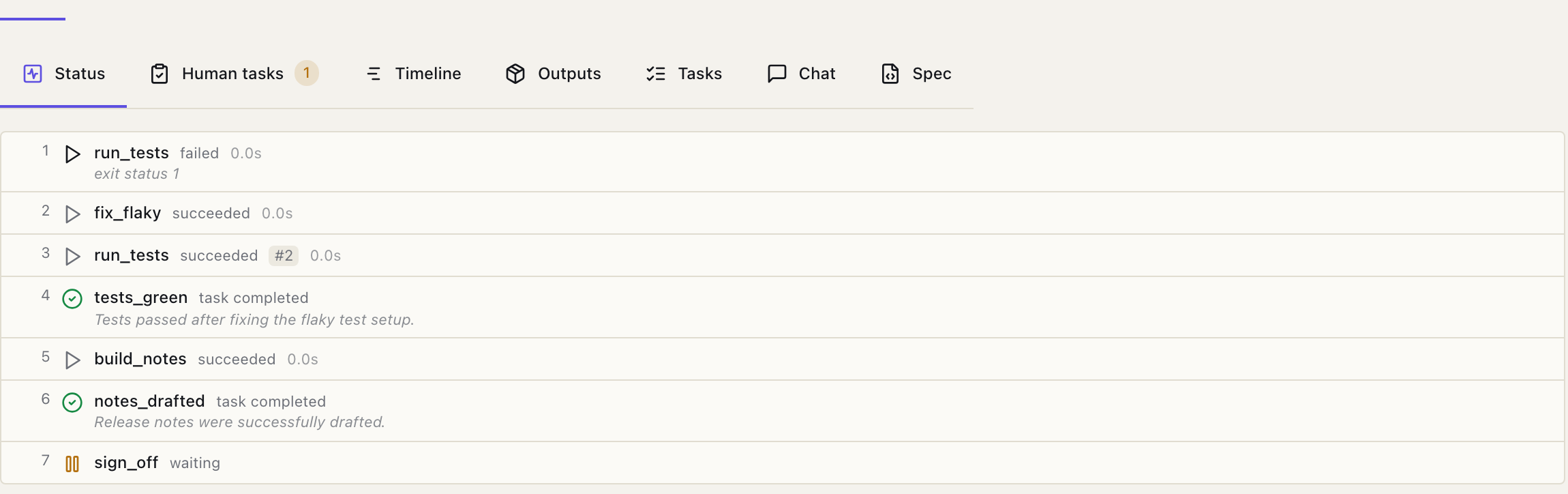
Repeated actions carry an attempt number, and durations are wall time, so a step that retried internally reads as the time it actually consumed. The steps table sits below, showing each step's latest attempt.
The Tasks tab shows each goal, whether it is complete, and the reason the agent gave. The Chat tab has the saved transcript. If observation aging has started, older tool results appear there as the same one-line summaries sent to the model on later turns.
Limits
llm.max_tool_iterations caps the number of decisions in one run; it defaults to 50 for agents. Hitting the cap with tasks still open fails the run and names the tasks that were left open.
The root llm block also controls observation size and context aging:
llm:
  max_tool_iterations: 50
  observation_max_bytes: 524288
  max_context_tokens: 200000
observation_keep_recent: 20| Field | Default | Effect | Zero value |
|---|---|---|---|
observation_max_bytes | 524288 | Caps each agent-facing tool result and repeated human answer without changing the source record. | Disables the size cap. |
max_context_tokens | 200000 | Starts aging after a decision reports a prompt at or above the threshold. | Disables proactive aging. |
observation_keep_recent | 20 | Keeps this many recent tool results complete after aging starts; older results become one-line summaries. | Disables aging and overflow recovery. |
Dagu does not infer the model's window, so set max_context_tokens low enough to leave room for another decision and response. If the provider reports a context overflow before the threshold is reached, Dagu compacts every tool result that can be made smaller and retries the current model once. A second overflow, or a request compaction cannot reduce, advances to the next configured model. The run fails if no model remains.
If the model answers without choosing an action while tasks remain open, it gets one reminder. A second silent turn fails the run.
These are the caps an author sets. For the full runtime picture (every limit in one table, context-window behavior, retry layers, and what survives a suspension or retry), see Agent DAG Internals.
When to reach for an Agent DAG
Reach for an Agent DAG when the order genuinely cannot be written down in advance: the next step depends on what a reviewer says, on what an earlier step produced, or on how many times something has already been tried.
If you can draw the graph, draw the graph. type: graph is cheaper, faster, and reproducible.
For concrete shapes this fits (runbook automation, self-healing operations, dispatch over a workflow library, human-in-the-loop), see when to reach for an Agent DAG.