

Runtime Profiles
Runtime profiles let you choose a named set of environment variables and secrets when a DAG run starts. They are useful when the same DAG should run against different runtime contexts, such as dev, staging, and prod, without copying environment values into the DAG file.
A runtime profile is not part of the DAG YAML. It is selected at run time from the Web UI, CLI, REST API, or an authorized webhook request. The selected profile name is recorded in run history, and the profile values are resolved when each run attempt starts.
Runtime profiles are configuration overlays within a Dagu deployment. They do not isolate the scheduler, local execution host, coordinator, workers, queues, or storage. Run separate Dagu deployments when development, staging, and production require independent execution boundaries.
When To Use Runtime Profiles
Use runtime profiles when values are shared across many runs or when the operator should choose the environment at launch time:
- Deployment targets such as
dev,staging, andprod. - Shared non-secret settings such as
LOG_LEVEL,REGION, orAPI_BASE_URL. - Shared credentials that should be selected with the target environment.
- Manual or queued runs where the same DAG should run with different backing services.
Use regular DAG env: when a value belongs to the workflow definition itself. Use params: when the value is part of one run's business input, such as a date, account ID, or batch size. Use secrets: when the DAG should always resolve a specific secret ref from YAML.
Default Profile Layers
Runtime profiles support inherited default layers. These layers are resolved automatically and do not need to be selected at run start.
| Layer | When it applies | Purpose |
|---|---|---|
| Global defaults | Every DAG run | Installation-wide fallback variables and secrets |
| Workspace defaults | DAGs with labels: [workspace=<name>] | Team- or environment-specific fallback values |
| Selected profile | Runs started with --profile, profileName, the Web UI selector, or an allowlisted webhook header | Explicit runtime environment chosen for that run |
Resolution order is:
Global defaults < Workspace defaults < Selected profileIf more than one layer defines the same key, the later layer overrides the earlier one. Defaults are best for shared baseline values such as REGION, HTTP_PROXY, or common credentials. Selected profiles are best when the operator needs to choose between environments such as dev, staging, and prod.
A workspace default applies only when the DAG has a workspace label:
labels:
- workspace=opsA DAG without a workspace label can still receive Global defaults. It does not receive defaults from any named workspace.
Profile Entries
Each profile contains entries. Each entry has an environment variable key and one of two kinds:
| Kind | Stored value | Runtime behavior |
|---|---|---|
| Variable | Plain text metadata in the profile store | Injected as a normal environment variable |
| Secret | A Dagu-managed secret value | Injected as a secret environment variable and masked in logs and status output |
Profile keys must be valid environment variable names. They must start with a letter or underscore and contain only letters, numbers, and underscores. Keys beginning with DAGU_ are reserved for Dagu-managed runtime metadata and are rejected.
Profile names must be lowercase slugs. A valid name starts with a lowercase letter or number and then uses lowercase letters, numbers, ., _, or -.
Create A Profile
From the Web UI, open Profiles & Secrets, select the Profiles tab, and create a profile such as prod. Add variables and secrets from the profile details table.
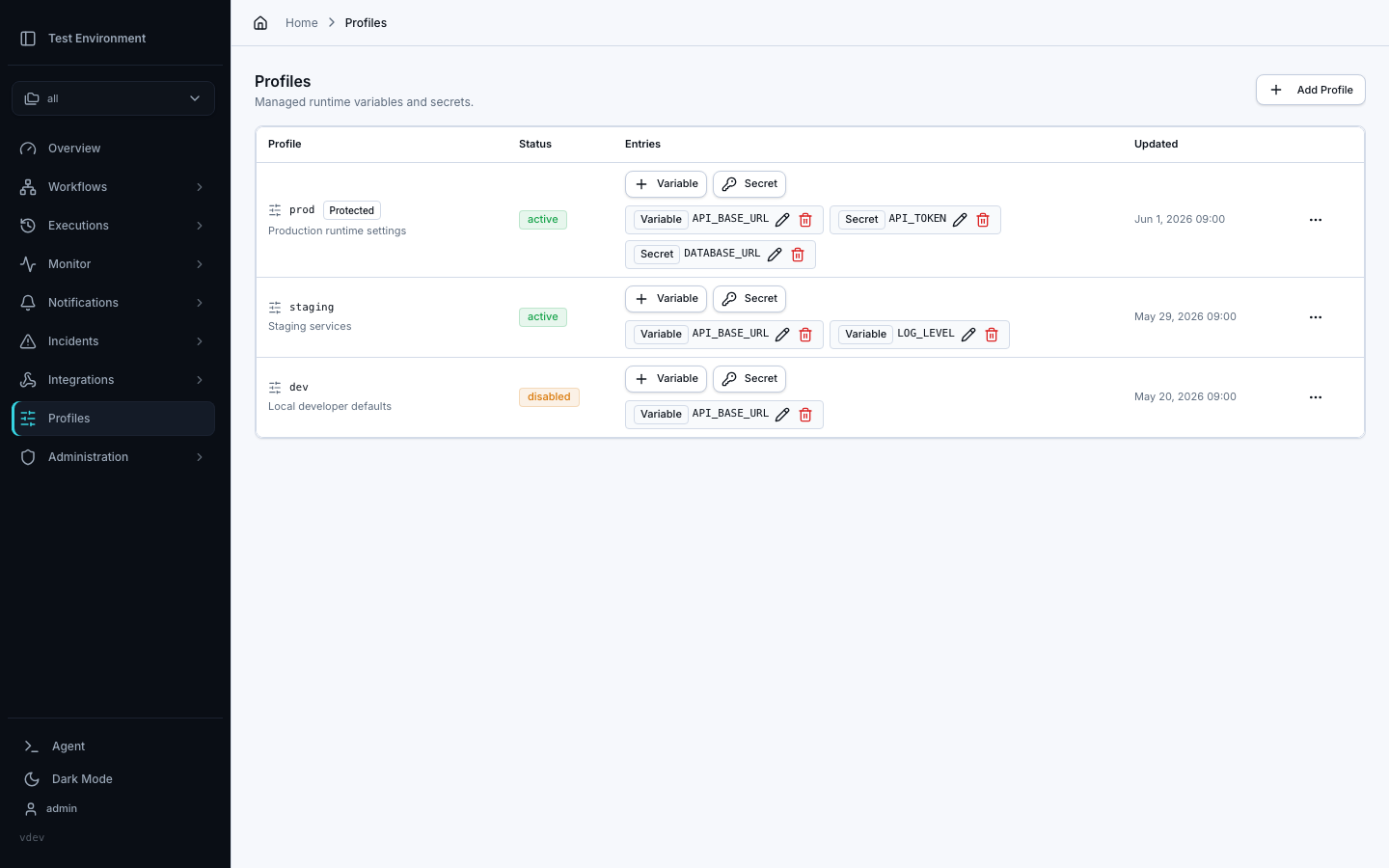
From the CLI, profile management is local to the configured Dagu home. Remote CLI contexts do not manage profiles; use the Web UI or REST API on the remote server instead.
dagu profile create prod --description "Production runtime settings"
dagu profile set-var prod LOG_LEVEL info
dagu profile set-var prod API_BASE_URL https://api.example.com

printf '%s\n' "$PROD_API_TOKEN" | dagu profile set-secret prod API_TOKEN --value-stdinInteractive secret entry is also supported:
dagu profile set-secret prod DATABASE_URLThe CLI prompts for the secret value and does not echo it back.
Start A Run With A Profile
Use --profile with local start, enqueue, or dry:
dagu start etl.yaml --profile prod -- DATE=2026-06-01
dagu enqueue etl.yaml --profile prod -- DATE=2026-06-01
dagu dry etl.yaml --profile prodRemote CLI start and enqueue reject --profile. To start a remote run with a profile, use the Web UI profile selector or send profileName through the REST API:
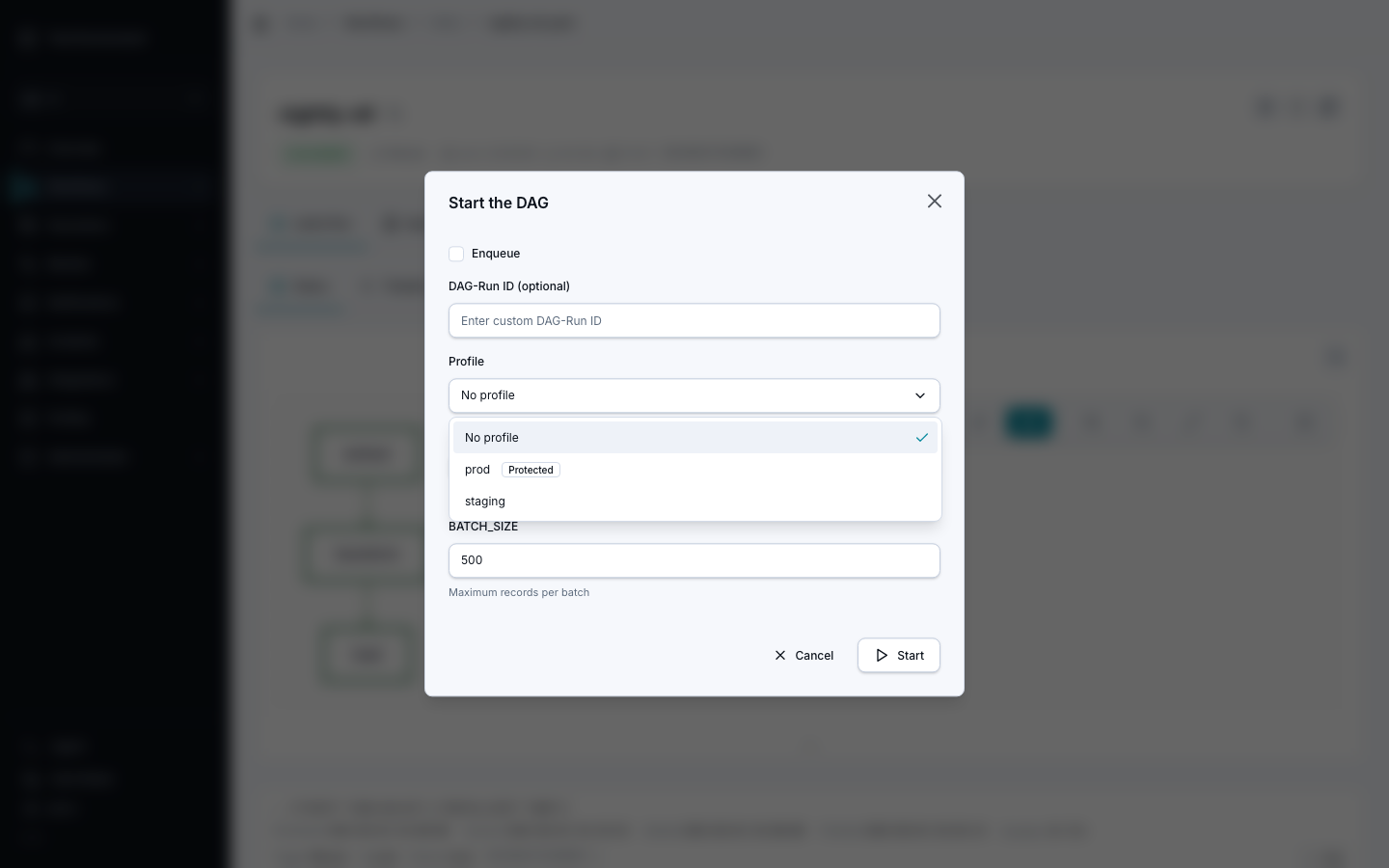
curl -X POST "http://localhost:8080/api/v1/dags/etl.yaml/start" \
  -H "Content-Type: application/json" \
  -d '{
        "params": "{\"DATE\":\"2026-06-01\"}",
        "profileName": "prod"
}'The same profileName field is accepted by start, synchronous start, enqueue, and inline DAG-run execution endpoints.
Webhook Runs
An admin can allow specific runtime profiles on each webhook. Once configured, the caller selects one by sending X-Dagu-Profile:
curl -X POST http://localhost:8080/api/v1/webhooks/etl.yaml \
  -H "Authorization: Bearer $WEBHOOK_TOKEN" \
-H "X-Dagu-Profile: prod"The profile must be in that webhook's allowlist and must still exist and be active. Omitting the header keeps the DAG's normal default-profile resolution. Changes to the allowlist take effect without a server restart.
Webhook credentials can select every profile in their allowlist, including protected profiles, so admins should grant only the profiles the integration needs. See Webhooks for configuration, HMAC signing, and error behavior.
When several callers share one DAG and each may use only its own profile, an admin can instead create a profile token for each caller. A request with a profile token always runs with that token's profile, and the allowlist does not apply.
Scheduled Runs
The scheduler uses the DAG's effective default runtime profile from server-side DAG settings when it evaluates profile-scoped schedule entries:
schedule:
  - expression: "*/20 * * * *"
    profile: prod
  - expression: "30 */2 * * *"
profile: devIn this example, a scheduler environment whose DAG default profile is prod activates prod entries. A scheduler environment whose DAG default profile is dev activates dev entries. Unscoped schedule entries are always active, and profile-scoped entries are ignored when the DAG has no default runtime profile.
The schedule entry's profile field is not a per-run profile override. It is only an activation filter for the schedule entry. The run still uses the effective profile selected through the normal runtime profile path.
Runtime Behavior
When a run starts, Dagu:
- Resolves Global defaults if they exist.
- Resolves workspace defaults when the DAG belongs to a named workspace.
- Validates that the selected profile exists and is active when one was selected.
- Merges the layers in precedence order.
- Injects variables as run-level environment variables.
- Injects secrets as secret environment variables.
- Records the effective profile entry metadata in run status.
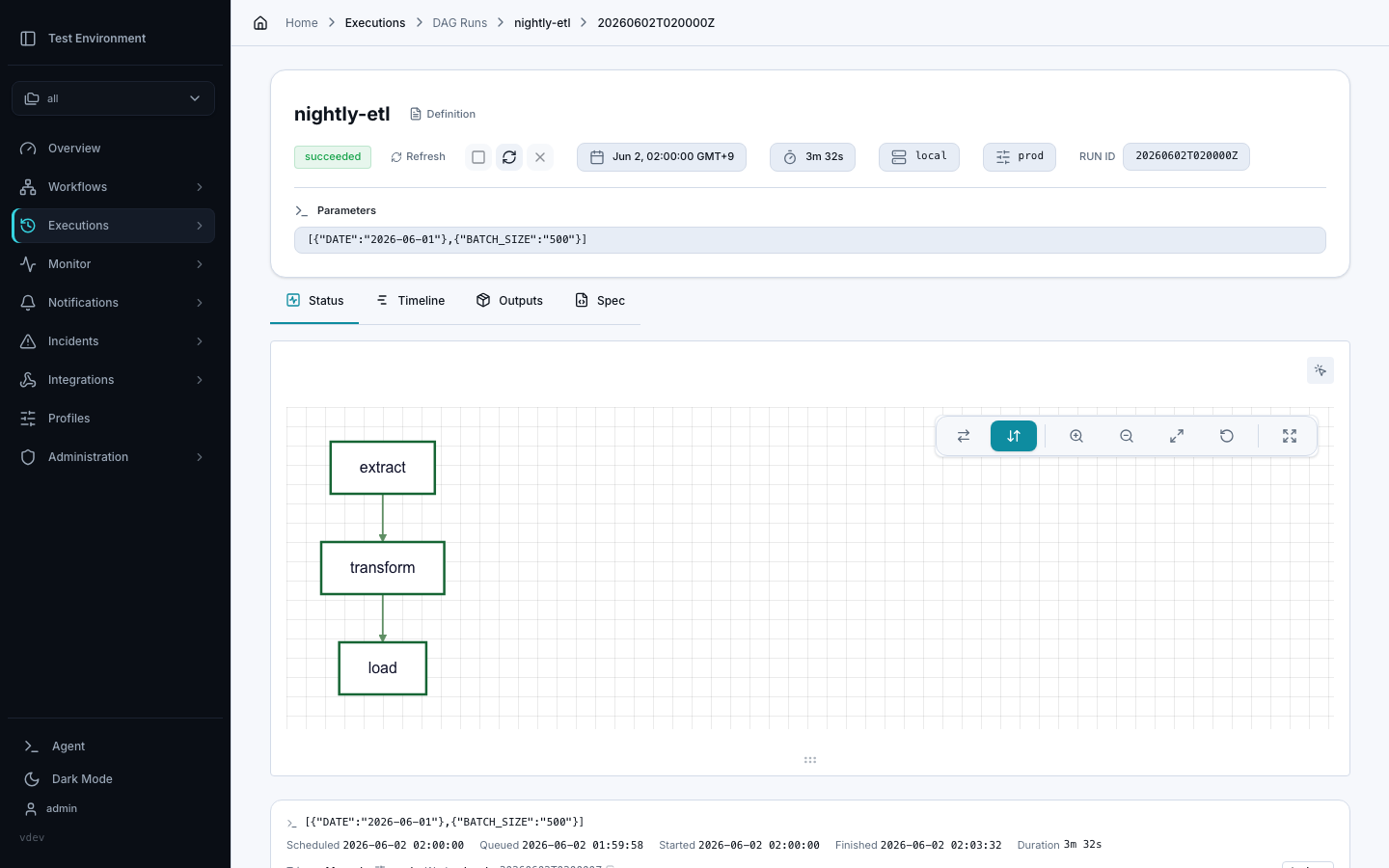
Secret entry plaintext is write-only. API and UI responses show secret entry metadata, not the secret value.
Default profile entries are fallback values. A selected profile overrides default layers for matching keys. Step-level env: can still override variables for a single step. Profile secrets are treated as secrets, so they participate in secret masking. Avoid reusing the same key across DAG env:, DAG secrets:, default layers, and selected profiles unless the override behavior is intentional.
Distributed Runs
For a distributed run, the coordinator that owns the task resolves the profile layers and sends the values to the active worker. Workers do not need a copy of the profile or Dagu-managed secret stores. Child DAGs inherit the selected profile while resolving defaults against each child's workspace, including nested children started from a worker.
Profile secrets travel over coordinator gRPC. Configure peer TLS or mTLS outside an isolated trusted network.
Retries
Retries inherit the original run's profile name. Profile selection is immutable across retry paths, including CLI, API, queue, scheduler, worker, and sub-DAG retry flows.
The profile's current values are resolved again when the retry attempt starts. This means rotating a profile secret affects future attempts, including retries, but the retry cannot switch to a different profile.
dagu retry --run-id=20260601T143120Z etlThere is no --profile option for dagu retry.
Sub-DAGs
When a DAG starts a sub-DAG through Dagu's sub-workflow execution path, the selected profile is passed to the sub-DAG run. Sub-DAG retries inherit the profile recorded on that sub-DAG run.
This keeps a root run and its child runs on the same runtime profile unless a separate top-level run is started with a different profile.
Protected Profiles
A protected profile is intended for higher-risk credentials or production environments.
Protected profile behavior:
- Only admins can create a protected profile.
- Only admins can view, update, delete, or use a protected profile.
- Managers can manage non-protected profiles.
- A user with run permission can use an active non-protected profile by name.
- Disabled profiles cannot be used for new runs.
Protection is an authorization boundary. It is not an approval workflow or a confirmation prompt. Use audit logs and your normal change-control process for sensitive profile changes.
Relationship To Secrets
Runtime profile secret entries use Dagu-managed secrets internally. They are different from standalone DAG YAML secrets: refs:
secrets:
  - name: DB_PASSWORD
ref: prod/db-passwordUse standalone secrets: refs when the DAG should always resolve the same named secret from YAML. Use runtime profile secrets when the operator chooses the runtime environment for a run.
Do not manage profile-owned backing secrets as DAG secret refs. Create and rotate them through the Profiles tab on the Profiles & Secrets page, profile CLI, or profile API so the profile entry and secret value stay consistent.
REST API
Runtime profile endpoints are available under /api/v1/profiles:
| Method | Path | Purpose |
|---|---|---|
GET | /profiles | List runtime profiles |
POST | /profiles | Create a profile |
GET | /profiles/{profileName} | Get one profile |
PATCH | /profiles/{profileName} | Update description, status, or protection |
DELETE | /profiles/{profileName} | Delete a profile |
PUT | /profiles/{profileName}/variables/{key} | Set a plain variable entry |
PUT | /profiles/{profileName}/secrets/{key} | Set or rotate a secret entry |
DELETE | /profiles/{profileName}/entries/{key} | Delete an entry |
GET | /profiles/_global | Get Global runtime profile defaults |
PATCH | /profiles/_global | Update Global defaults metadata |
PUT | /profiles/_global/variables/{key} | Set a Global default variable |
PUT | /profiles/_global/secrets/{key} | Set or rotate a Global default secret |
DELETE | /profiles/_global/entries/{key} | Delete a Global default entry |
GET | /profiles/_workspaces/{workspaceName} | Get workspace runtime profile defaults |
PATCH | /profiles/_workspaces/{workspaceName} | Update workspace defaults metadata |
PUT | /profiles/_workspaces/{workspaceName}/variables/{key} | Set a workspace default variable |
PUT | /profiles/_workspaces/{workspaceName}/secrets/{key} | Set or rotate a workspace default secret |
DELETE | /profiles/_workspaces/{workspaceName}/entries/{key} | Delete a workspace default entry |
Example:
curl -X POST "http://localhost:8080/api/v1/profiles" \
  -H "Content-Type: application/json" \
  -d '{"name":"prod","description":"Production runtime settings"}'

curl -X PUT "http://localhost:8080/api/v1/profiles/prod/variables/LOG_LEVEL" \
  -H "Content-Type: application/json" \
  -d '{"value":"info"}'

curl -X PUT "http://localhost:8080/api/v1/profiles/prod/secrets/API_TOKEN" \
  -H "Content-Type: application/json" \
-d '{"value":"secret-token"}'Global defaults example:
curl -X PUT "http://localhost:8080/api/v1/profiles/_global/variables/REGION" \
  -H "Content-Type: application/json" \
-d '{"value":"us-east-1"}'Workspace defaults example:
curl -X PUT "http://localhost:8080/api/v1/profiles/_workspaces/ops/secrets/OPS_TOKEN" \
  -H "Content-Type: application/json" \
-d '{"value":"secret-token"}'Secret values are write-only. Profile responses include the secret entry key, kind, and backing secret ID, but not plaintext.