

Wiki
Wiki keeps operational knowledge next to the workflows it explains. Use the Web UI to write Markdown runbooks, troubleshooting notes, handoff guides, and diagrams without leaving Dagu.
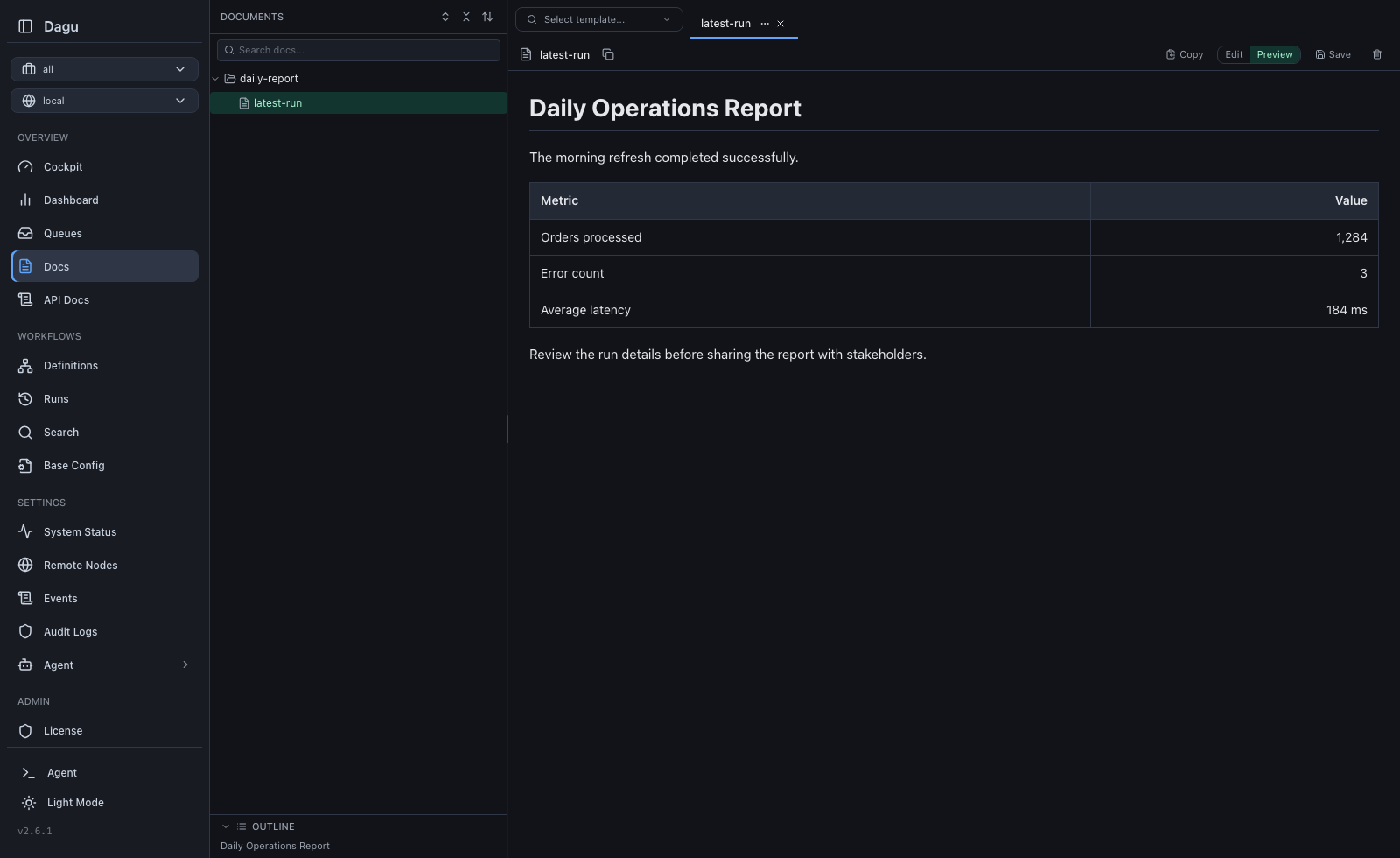
What You Can Do
- organize Markdown files in a nested file tree
- create, rename, move, and delete files and folders
- keep several pages open in tabs
- edit Markdown and preview the rendered result side by side
- render Mermaid diagrams in the preview
- jump through long pages from the generated outline
- search page names and contents
- scope pages to the default or a named workspace
- synchronize pages with a Git repository through Git Sync
Browse And Organize Pages
Open Wiki from the navigation. The sidebar shows the page tree for the selected workspace.
Use the tree actions to:
- create a page or folder
- rename an item
- drag an item into another folder
- select several items for deletion
- expand or collapse nested folders
Page names use the .md extension. Dagu adds it when a new page name omits the extension. A file and a directory cannot have the same path identity, so names such as runbook.md and runbook/ cannot exist side by side.
Moving pages between workspaces is not supported. Select the destination workspace first and create or synchronize the page there.
Edit And Preview Markdown
Open a page to add it as a tab. The editor provides:
- Edit and Preview modes
- standard Markdown rendering
- Mermaid diagram rendering
- an outline generated from headings
Ctrl+SorCmd+Sto save
Dagu keeps unsaved content in browser storage so an accidental navigation or reload does not immediately lose the draft. Drafts are separated by authenticated user, remote node, and workspace. Saving or discarding the draft clears the stored copy.
An open page with unsaved changes must be saved before it can be renamed or moved. This keeps the editor buffer attached to the correct file.
When another user or Git Sync changes an open page, the editor reports the external update instead of silently overwriting local edits. Wiki receives live update events when available and falls back to periodic refreshes.
Workspace Scoping
Wiki follows the workspace selector:
| Selection | Pages shown |
|---|---|
| All workspaces | Pages from every workspace the account can access. This aggregate view is for browsing and search. |
| Default | Pages that are not assigned to a named workspace. |
| Named workspace | Only pages owned by that workspace. |
Select Default or a specific named workspace before creating, renaming, moving, or deleting content.
On disk, Dagu stores default pages directly under paths.wiki_dir and named-workspace pages under a workspace directory:
<paths.wiki_dir>/
|-- operations/
|   `-- runbook.md
`-- platform/
`-- incident-response.mdIn this example, operations/runbook.md belongs to Default, while platform/incident-response.md belongs to the platform workspace.
Renaming a workspace moves its page tree to the new workspace name. A workspace cannot be deleted while it still contains pages; move or remove those pages first.
See Workspaces for access rules and lifecycle behavior.
Search
The Wiki sidebar filters the current tree by file name and page content. Dagu's global Search page also returns matching pages and the lines containing the query, subject to workspace access.
Maintain Wiki With AI Agents
Any AI agent or coding assistant that supports MCP can maintain Wiki pages through Dagu's built-in MCP server. The integration is not tied to a specific AI provider or client. Connect the agent to the Dagu /mcp endpoint, then ask it to search and read pages or create, update, rename, move, and delete them.
Wiki operations use the same authentication, workspace permissions, Git Sync write policy, and audit trail as the Web UI and REST API. Give the agent the narrowest access it needs, specify the target workspace and page path in the request, and preview changes before applying them when appropriate.
See the MCP Quickstart to connect an agent, MCP Clients for client-specific examples, and MCP Tools for Wiki operations.
Storage Configuration
The page root is configured with paths.wiki_dir:
paths:
  dags_dir: /opt/dagu/dags
wiki_dir: /opt/dagu/dags/wikiThe equivalent process configuration variable is DAGU_WIKI_DIR. A fresh installation uses <paths.dags_dir>/wiki when no value is configured.
Existing installations remain in place: when wiki does not exist but the legacy docs directory does, Dagu adopts docs as the Wiki root. Startup fails if both directories exist so that content is never merged implicitly. The deprecated paths.docs_dir and DAGU_DOCS_DIR configuration aliases remain accepted with a warning.
See Configuration for deployment and storage details.
Use Wiki From A Workflow
Each run receives the page directory for its DAG as ${context.paths.wiki_dir}. Processes receive the same path as DAG_WIKI_DIR.
steps:
  - id: print_runbook
run: cat "${context.paths.wiki_dir}/runbook.md"For a default-workspace DAG named operations, the path resolves to <paths.wiki_dir>/operations. For the same DAG in the platform workspace, it resolves to <paths.wiki_dir>/platform/operations.
DAGU_WIKI_DIR configures the server-wide page root. DAG_WIKI_DIR is the per-DAG path projected into a running step.
The deprecated ${context.paths.docs_dir}, ${paths.docs_dir}, and DAG_DOCS_DIR aliases resolve to the same directory for existing workflows.
See Runtime Context and Variables for the full runtime contract.
Git Sync
Git Sync tracks pages under wiki/ in a new repository. Existing repositories with only docs/ continue using that directory in place. A repository containing both directories is rejected for the same reason as local storage. For example, the local page operations/runbook.md in a new repository is represented as:
repository path: wiki/operations/runbook.md
itemId:          wiki/operations/runbook
kind: docThe doc kind is a stable Git Sync wire value and has not changed.
Pulling writes repository pages into the configured page root. Publishing sends Web UI edits back to the repository when Git Sync writes are enabled. See Git Sync for setup, status, conflicts, and CLI commands.
Permissions
Authenticated users can browse pages in workspaces they are allowed to access. Creating, saving, renaming, moving, and deleting pages requires permissions.write_dags and a write-capable role for the selected workspace.